

A Milvus MCP server is a small program that publishes Milvus operations, such as vector search, full-text search, filtered queries, and collection management, as tools that any Model Context Protocol client (Claude Desktop, Claude Code, Cursor, and other agent hosts) can discover and call. The agent sees a list of named tools with JSON input schemas. The server turns each call into a Milvus request using the credentials it was started with. That last point defines the security model: an agent can do anything the server’s Milvus user is allowed to do, no matter what the tool descriptions say.
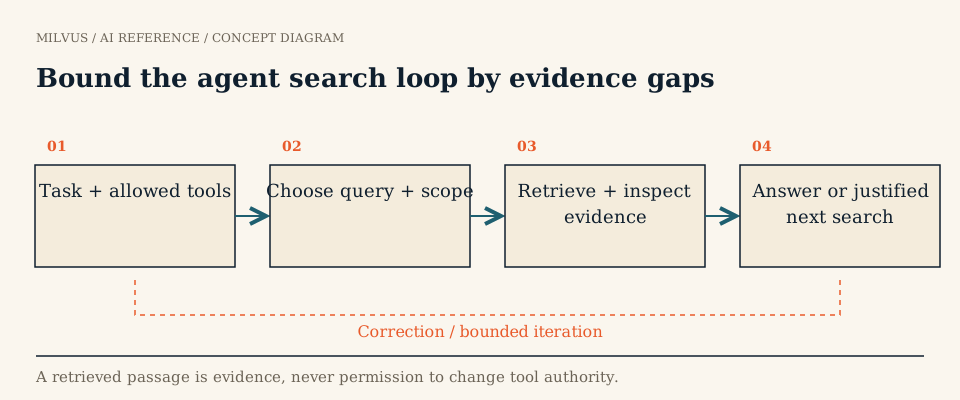 Bound the agent search loop by evidence gaps
How does MCP work, in one paragraph?
MCP is a client-server protocol built on JSON-RPC 2.0. The host application creates one MCP client per server. Servers offer three kinds of primitives: tools (actions the model can invoke), resources (context data), and prompts (reusable templates). A client calls tools/list to learn each tool’s name, description, and inputSchema, then tools/call to execute one. Two transports are standard: stdio for a local server launched by the host, and Streamable HTTP for a remote server that many clients share. A vector database fits naturally as a tool provider, since “search my knowledge base” is one of the most common things an agent needs to do.
Which tools does the Milvus MCP server expose?
The open-source mcp-server-milvus groups its tools into three families. Exact names and the full list change between releases, so read the current README or call tools/list against your build.
| Family | Example tools | Effect on data |
|---|---|---|
| Search and query | milvus_text_search, milvus_vector_search, milvus_hybrid_search, milvus_text_similarity_search, milvus_query | Read |
| Collection management | milvus_list_collections, milvus_get_collection_info, milvus_create_collection, milvus_load_collection, milvus_release_collection | Read, plus schema and memory changes |
| Data operations | milvus_insert_data, milvus_delete_entities | Write and delete |
The Milvus docs page on MCP describes a broader set that also covers counting, upserts, bulk insert, index creation, and loading progress. The takeaway is the same either way: the default tool surface includes operations that create, change, and delete data, alongside the read-only search tools most assistants need.
How do you run and connect it?
The server is a Python project run with uv. Point it at a Milvus endpoint:
# stdio (default): the MCP host launches the process
uv run src/mcp_server_milvus/server.py --milvus-uri http://localhost:19530

# Streamable HTTP: recommended for shared or production deployments
uv run src/mcp_server_milvus/server.py --streamable-http --milvus-uri http://localhost:19530 --port 8000
An SSE mode also exists. Configuration can come from environment variables MILVUS_URI, MILVUS_TOKEN, and MILVUS_DB (default default), and the README notes that a .env file takes priority over command-line arguments, which is worth knowing when a flag seems to be ignored. Claude Desktop and Cursor both register the server through their MCP JSON config files; the Milvus MCP guide has the exact snippets. The same server works against Milvus Lite, a self-hosted cluster, or a Zilliz Cloud endpoint, since all it needs is a URI and a token.
What should an MCP tool return to an agent?
An agent reasons over what the tool returns, so the response is part of your retrieval design:
- Stable IDs and source references so the agent can cite evidence and fetch more context.
- The text the agent needs, trimmed via
output_fieldsrather than whole records with large vectors. - The filters actually applied, so the agent (and your logs) can tell an empty result from an excluded one.
- Scores with their metric, because a COSINE score and an L2 distance read in opposite directions.
Decide whether a tool returns raw candidates or final, reranked evidence. Those are different contracts. Agentic search patterns and how agents choose between vector, keyword, and structured search go deeper on that design.
How do you keep an agent from doing too much?
Tool descriptions guide the model’s choices, but they are not a permission system. A prompt-injected document that says “drop this collection” is only harmless if the server cannot drop collections. Enforce limits below the model:
- Give the server its own Milvus user. With authentication and RBAC enabled, grant a role scoped to the collections the assistant should read, for example the built-in
CollectionReadOnlyprivilege group on one database. Never start the server withroot:Milvus. - Remove tools you do not need. If the assistant only searches, run a build that registers only search and query tools, or front it with a gateway that filters
tools/list. Do not rely on the model ignoring a delete tool. - Keep tenancy out of the model’s hands. Collection names and mandatory tenant filters should come from server configuration or a wrapper, not from free-form arguments the model fills in. See multi-tenancy design.
- Keep secrets out of prompts. Pass the token through environment or
.env, and make sure logs do not echo it. - Add write tools deliberately. If an agent must write (for example, to store agent memory), give it a separate role limited to that collection and design for retries and duplicate calls.
What should you test before shipping?
Run each tool directly, outside the agent, and check latency and correctness on its own. Then test the edges: a missing collection, a query with no relevant result, a call outside the permitted scope, and a natural-language instruction to perform a forbidden write. The server should reject the last one because Milvus refused it, and your logs should show which user made the call. Measuring tool quality separately from final answer quality tells you whether a bad answer came from retrieval or from the model.
Where to go next
To build a bounded retrieval loop around these tools, follow the agentic RAG with LangGraph tutorial and see how LangGraph state and Milvus retrieval fit together. For a production example of retrieval behind an AI assistant, read the Read AI customer story.