

DiskANN is a graph-based approximate nearest-neighbor (ANN) index that keeps most of its data on an SSD instead of in RAM. It stores the full-precision vectors and a navigation graph on disk, keeps only small product-quantized (PQ) codes in memory, and uses those codes to decide which few disk pages to read for each query. Use DISKANN in Milvus when your vectors are too large to hold in memory with HNSW at an acceptable cost, you have fast NVMe SSDs, and you can accept a few milliseconds of extra latency in exchange for serving several times more vectors per node.
The algorithm comes from Microsoft Research (Subramanya et al., NeurIPS 2019). The paper indexed one billion SIFT vectors on a single workstation with 64 GB of RAM, serving about 5,000 queries per second at under 3 ms mean latency and over 95% 1-recall@1, and reported 5 to 10 times more points per node than in-memory graph indexes such as HNSW.
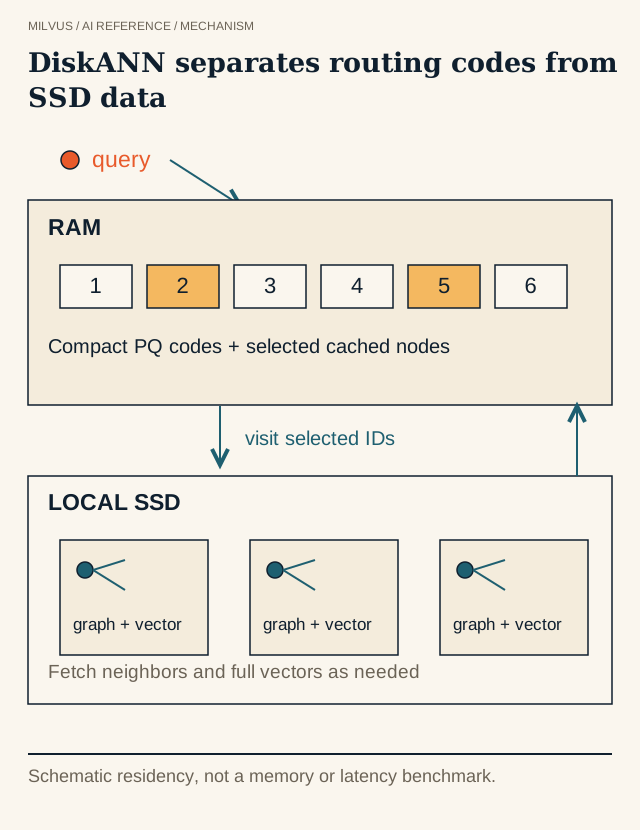 DiskANN: compact routing, SSD graph. Measure recall, memory and cold / warm tail latency together.
Why can’t you just put HNSW on disk?
A graph search makes many small, dependent hops. HNSW might visit hundreds of nodes per query, and if every hop meant a random SSD read, latency would explode. DiskANN fixes this in three ways:
- A graph with fewer hops. Its Vamana graph is built so a search reaches the target region in far fewer steps than a naive graph.
- Most distance calculations stay in RAM. Compressed PQ codes for every vector live in memory, so the algorithm can estimate distances to all neighbors of a node without touching disk.
- Reads are batched and laid out for SSDs. Each node’s full vector and its neighbor list are stored together in one disk block, and several promising nodes are fetched in parallel per round (beam search), which suits the high parallelism of NVMe drives.
How does the Vamana graph work?
Vamana builds a single-layer directed graph, unlike HNSW’s multi-layer hierarchy. Construction starts from a random graph and makes passes over every node. For each node it runs a greedy search from the graph’s entry point (the medoid, roughly the center of the dataset), collects the visited nodes as candidates, and prunes them down to at most MaxDegree neighbors using a rule with a slack factor (usually written α). The rule drops a candidate when an already-kept neighbor is substantially closer to it, which removes redundant short edges. Using α greater than 1 keeps some longer edges too. Those long-range shortcuts are what let a search cross the dataset in a small number of hops, which matters most when each hop may cost a disk read.
How does a DiskANN query run?
- Start at the entry point near the center of the data.
- Using the in-memory PQ codes, estimate the distances from the query to the current candidates’ neighbors and keep the best ones in a candidate list whose size is the search parameter
search_list. - Read the most promising unvisited nodes from SSD, several at once. Each read returns the node’s full-precision vector and its neighbor IDs.
- Recompute exact distances for the nodes just read, and add their neighbors to the candidate list using PQ estimates.
- Repeat until the candidate list stops improving, then return the top
kranked by exact distance.
PQ decides where to go, and the full vectors on disk decide the final ranking. That split is why DiskANN keeps high recall even with aggressive compression in RAM, something a pure PQ index cannot do.
DISKANN parameters in Milvus
DISKANN build parameters are set in milvus.yaml, not through the SDK index parameters. The Milvus DISKANN guide documents these under common.DiskIndex:
| Parameter | Range | Default | What it controls |
|---|---|---|---|
MaxDegree | [1, 512] | 56 | Maximum edges per node in the Vamana graph; higher improves recall, increases index size and build time |
SearchListSize | [1, int_max] | 100 | Candidate pool during construction; should be at least MaxDegree |
PQCodeBudgetGBRatio | (0.0, 0.25] | 0.125 | Size of the in-memory PQ codes relative to raw vector data |
SearchCacheBudgetGBRatio | [0.0, 0.3) | 0.10 | Memory used to cache frequently visited graph nodes |
BeamWidthRatio | [1, max(128 / CPU count, 16)] | 4.0 | Maximum parallel disk I/O requests per search, relative to CPU count |
# milvus.yaml
common:
  DiskIndex:
    MaxDegree: 56
    SearchListSize: 100
    PQCodeBudgetGBRatio: 0.125
    SearchCacheBudgetGBRatio: 0.1
    BeamWidthRatio: 4

queryNode:
  enableDisk: true
queryNode.enableDisk: true must be set, and the Milvus data directory should be on NVMe SSD for both query and index nodes. In the client you only choose the index type and tune one search parameter:
index_params = client.prepare_index_params()
index_params.add_index(
    field_name="embedding",
    index_type="DISKANN",
    metric_type="COSINE",
)
client.create_index(collection_name="docs", index_params=index_params)

res = client.search(
    collection_name="docs",
    anns_field="embedding",
    data=[query_vector],
    limit=10,
    search_params={"params": {"search_list": 100}},
)
search_list plays the same role as ef in HNSW: a larger candidate list raises recall and costs more disk reads and CPU per query.
How much memory and disk does DISKANN need?
With the default PQCodeBudgetGBRatio of 0.125, the PQ codes take about one-eighth of the raw vector size. For 100 million 768-dimensional float32 vectors (about 307 GB raw), that is roughly 38 GB of codes in RAM, plus the node cache, plus normal query-node overhead. The SSD holds the full vectors and the graph, so plan for noticeably more than the raw data size on disk.
Compare that with HNSW, which needs the full 307 GB of vectors plus graph links in memory. That difference is the case for DISKANN: same data, a fraction of the RAM, and a cheaper node shape. The memory estimation guide shows how to size the rest of the node.
When should you choose DISKANN?
DISKANN fits well when:
- The corpus is large enough that keeping all vectors in RAM dominates the bill, typically hundreds of millions of vectors or more.
- Your latency budget can absorb a few extra milliseconds; p99 targets in the tens of milliseconds are comfortable.
- Nodes have local NVMe with high random-read IOPS. Network-attached or contended disks hurt badly because every query issues several rounds of parallel reads.
Prefer HNSW or a compressed HNSW variant when the data fits in memory and you need the lowest latency. Prefer IVF variants with quantization when you need fast rebuilds and can accept lower recall. And keep DISKANN separate from mmap: memory-mapping an in-memory index lets the operating system page it to disk, but the index was not laid out for SSD access, so cold queries can trigger many scattered reads. The index selection guide puts all of these options side by side.
How should you benchmark DISKANN?
Hold the vectors, metric, filters, and k fixed, and compute exact ground truth with a FLAT baseline. Sweep search_list and record Recall@k, p50/p95/p99 latency, throughput, disk IOPS and queue depth, and resident memory. Test three states, not one: cold start right after loading, warmed steady state, and a shifted query distribution that misses the node cache. Tail latency during warm-up and after a node replacement is often what decides whether DISKANN works in production. Compare against HNSW at matched recall and matched cost per query, not at matched parameters.
Start with the Milvus Quickstart and the DISKANN guide. For data that spans hot and cold access patterns, also read about Milvus tiered storage and how to separate hot vector serving from cold lake data.