
Open Tag: An Open-Source Claude Tag for Claude Code and Codex
A couple of days ago, Anthropic released Claude Tag: a persistent Claude that lives in Slack.
The pattern is immediately useful. You tag Claude in the channel where the work is happening. It reads the thread, picks up the context, and responds in place, more like a teammate than a separate chat window.
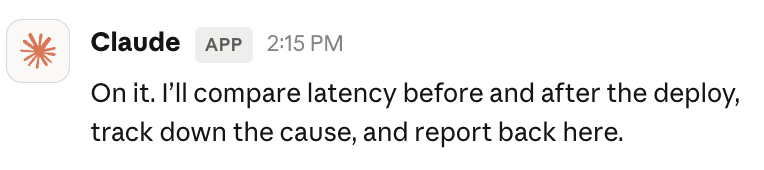 Claude posting in a Slack channel
However, Claude Tag is currently limited to Claude Enterprise and Team customers. Individual users do not get it. Codex users and many others are also outside the loop.
 Anthropic's announcement, "available today in beta for Claude Enterprise and Team customers"
That timing was interesting for us because we had spent the last six months building MFS, short for Multi-source File-like Search. MFS is a context harness for agents: it takes scattered context across code, docs, tickets, chat, databases, SaaS tools, and object stores, and exposes it through one searchable, browsable, file-like interface.
So we used MFS to build an open-source version of the Claude Tag pattern.
We call it Open Tag.
With Open Tag, you can mention @OpenClaude in Slack. If you are using Codex, the same pattern works as @OpenCodex. The bot reads the current thread, pulls in the context you have authorized, asks the backend agent to do the work, and posts the result back to Slack.
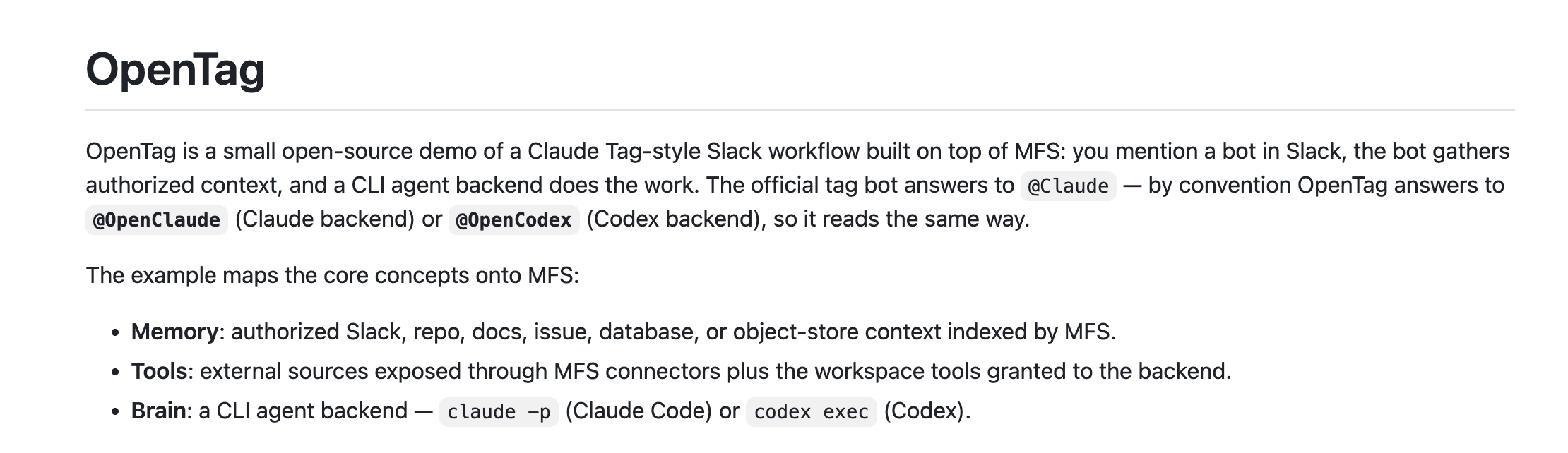 the OpenTag GitHub README
Open Tag is the open-source implementation we built on top of MFS.
In our own test, Open Tag reviewed a live PR in about three minutes. In a small code-search benchmark, the MFS retrieval loop cut token use from 962 tokens to 460 tokens on average, while improving the final correct-file result from 22/24 to 23/24. More on the benchmark below.
The important part is this: Open Tag is not just a Slack bot. The Slack bot is the easy piece. The hard part is memory and tools — giving an agent a reliable way to find, verify, and use context across many systems without dumping everything into the prompt.
That is what MFS provides.
Open Tag in Action
Before getting into the architecture, here is what Open Tag looks like in use.
1. Install and configure Open Tag locally
Open Tag ships with an open-tag-admin skill. Because it lives under the examples/ directory in the MFS repo, install it with --full-depth:
npx skills add zilliztech/mfs --full-depth --skill open-tag-admin -a claude-code -a codex -g
You call the skill from Claude Code or Codex, and the agent walks you through the local setup: credentials, environment variables, MFS connection, preflight checks, and launch.
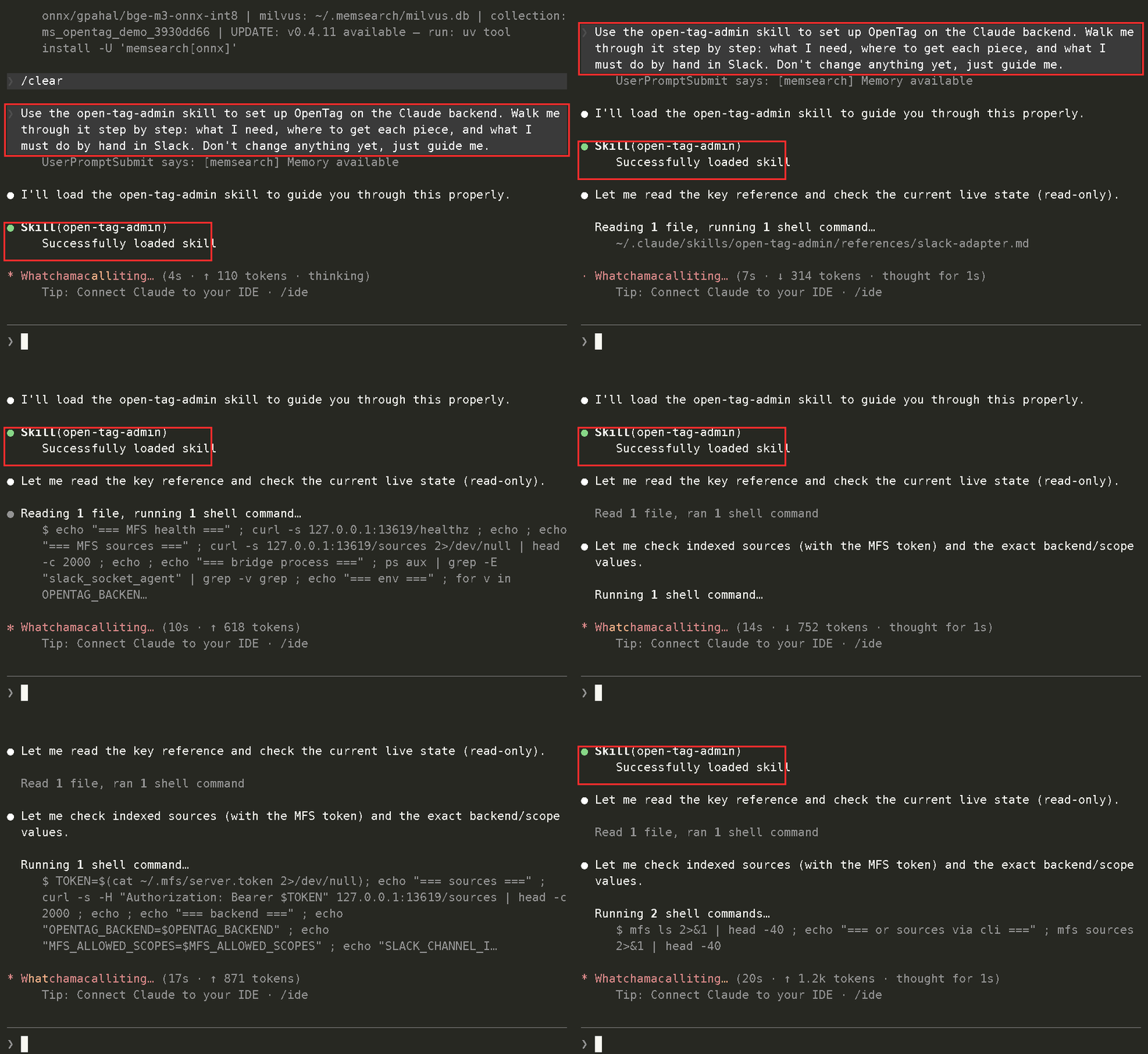 Agent-guided local install and configuration
The setup flow is intentionally agent-driven. You do not need to memorize every command before trying it. You tell the agent what you want to run, and the skill handles the setup path.
For example:
I want to run an Open Tag bot but I don't have any Slack credentials yet.
Walk me through creating the Slack app, turning on Socket Mode, and getting the bot and app tokens.
Tell me which scopes to add and where each token goes.
Or, if you already have credentials:
Set up an Open Tag bot using the Claude backend, listening in my Slack channel.
The Slack tokens are already in my environment.
Run the preflight checks, then start the bridge once everything looks good.
2. Review a real PR with Open Tag
For a simple demo, I created a Slack bot called OpenClaude, invited it into a Slack channel, and mentioned it in a thread.
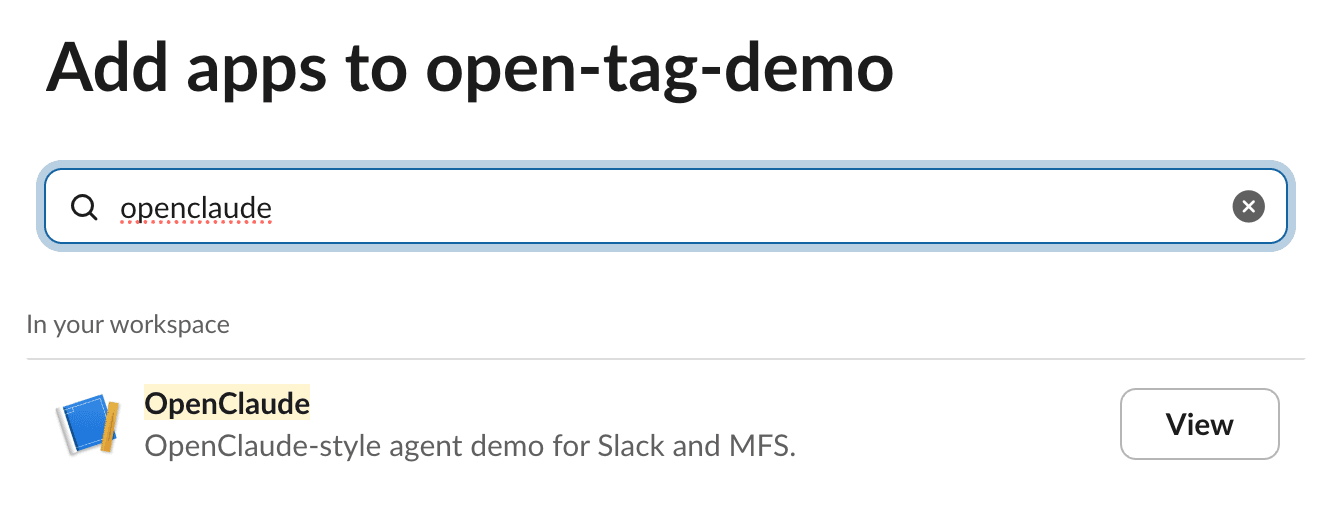 Adding the OpenClaude app to a Slack workspace.
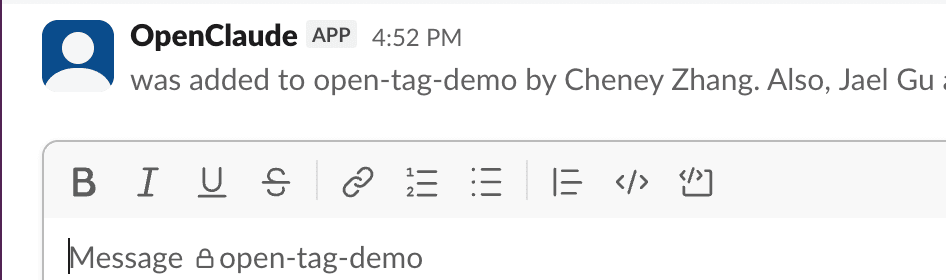 Adding the OpenClaude app to a Slack workspace.
Then I gave Open Tag a real engineering task:
Review the latest PR and Issue in my open-source project memsearch and give me a professional opinion.
About three minutes later, Open Tag came back with a detailed review and concrete suggestions. From there, I could keep the workflow going and ask it to take the next step, such as merging the PR after review.
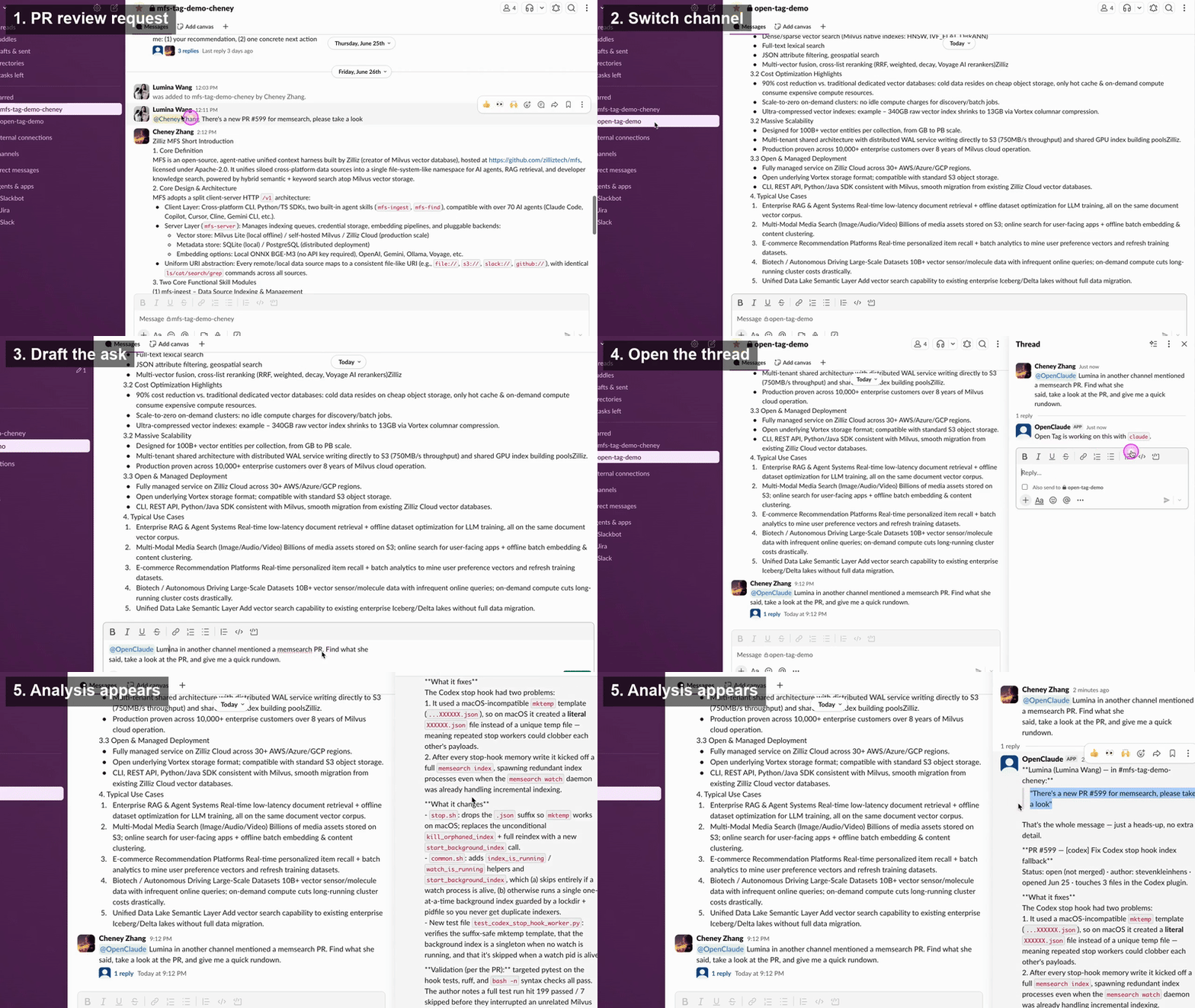 Open Tag reviewing a PR and returning suggestions in Slack.
This is only a GitHub demo. At configuration time, you can connect other sources as well: repos, docs, tickets, Slack history, databases, object stores, and more. The broader the authorized context, the more useful the Slack agent becomes.
The full example lives in the Open Tag demo in the MFS repo.
One caveat: this is a local demo. The reference example does not yet implement strict sandbox isolation or production-grade permission management. Before deploying a system like this in production, you should understand the runtime, the credentials, the data scopes, and the security boundary.
What We Actually Rebuilt
A Claude Tag-style system has three pieces:
- Brain: the model or coding agent that reasons and plans.
- Memory: the persistent context the agent can recall over time.
- Tools: the external systems the agent can read from or act on.
For Open Tag, the brain is not the hard part. You can mount Claude Code or Codex.
The Slack shell is not the hard part either. Listen for app_mention, read the thread, pass the task to the backend, and post the response. That adapter is a few hundred lines of glue code.
The hard part is the combination of memory and tools.
A useful Slack agent cannot rely only on the current thread. Work context is scattered across GitHub PRs, issues, design docs, tickets, Slack history, database rows, object stores, PDFs, and internal notes. The agent needs to reach those systems, find the relevant slice, verify the original source, and then answer or act.
It also cannot solve the problem by loading everything into the prompt. That is slow, expensive, and noisy. It gets worse as the number of sources grows.
So the real engineering problem is:
How do you let an agent search across many isolated systems in real time, retrieve the right context, cite the source, and keep token cost low?
Open Tag uses MFS for that layer.
In this architecture, Open Tag is the Slack-facing adapter. MFS is the memory and tools engine behind it.
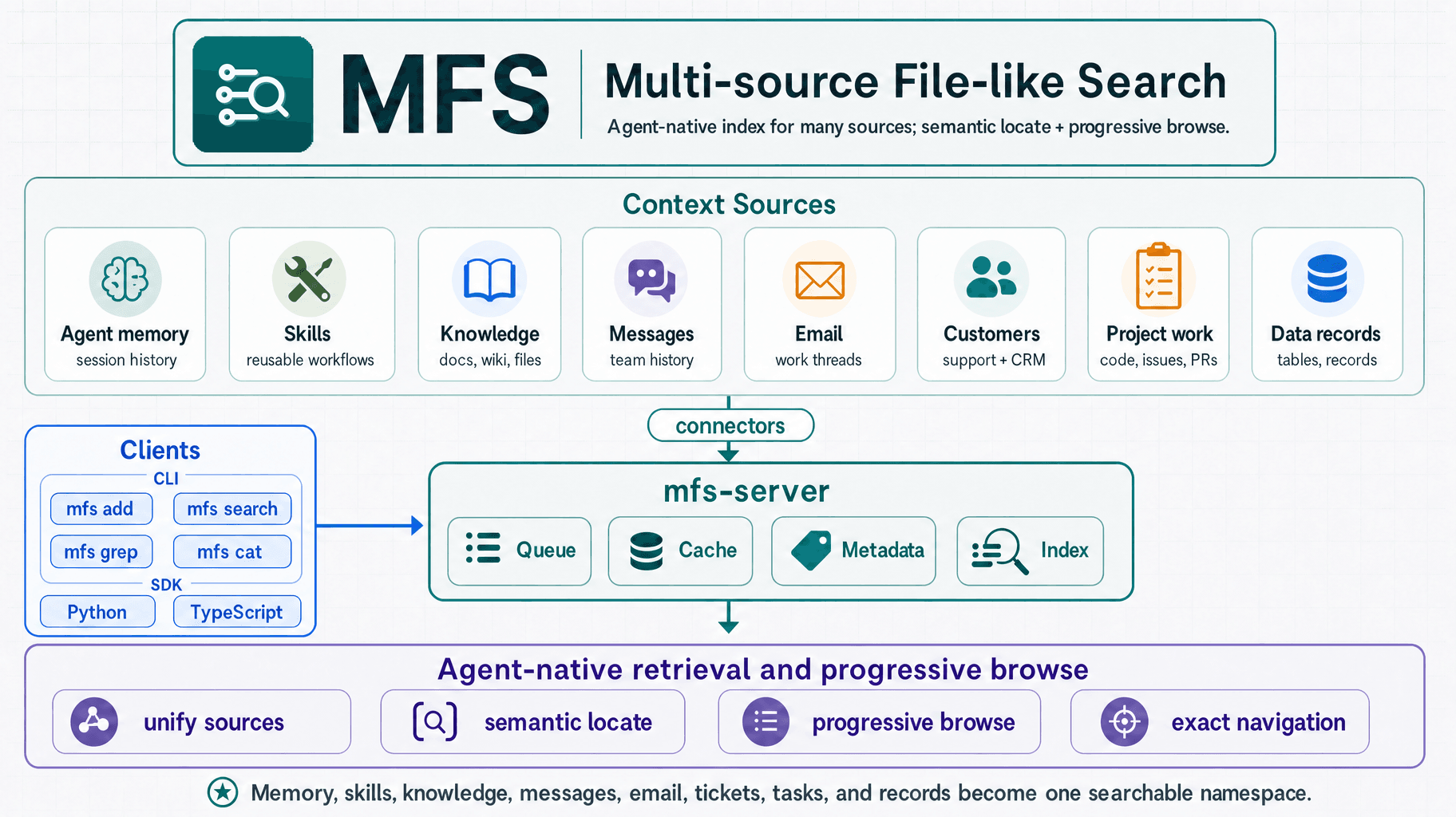 MFS overview — context sources to connectors to mfs-server to agent-native retrieval and browse
MFS: The Memory and Tools Layer Behind Open Tag
MFS stands for Multi-source File-like Search.
The design is based on two engineering decisions:
- Expose every source through a stable, file-like URI interface.
- Combine search and browse instead of treating them as competing retrieval strategies.
The first decision gives the agent one way to reach many systems. The second gives it a low-token way to find and verify context.
Together, they turn scattered enterprise context into something an agent can traverse.
1. One URI Interface Across Heterogeneous Sources
Agents are good at shell workflows.
tree, ls, cat, grep, and search are compact and predictable. They give the model a small action space with dense information. But those commands assume a filesystem-like structure.
Most useful work context is not in a filesystem. It is in GitHub, Slack, Jira, Linear, Notion, Postgres, S3, Google Drive, Gmail, PDFs, CRM records, and internal docs.
MFS maps those sources into a virtual tree.
A Postgres table becomes a tree you can ls into, where each row is a JSON object you can cat. A GitHub repo, its issues, and its PRs become browsable nodes. A PDF, an S3 bucket, a Notion page, and a Slack thread can all be represented as stable URIs.
From the agent’s point of view, every source becomes navigable with the same atomic operations.
mfs tree github://acme/backend -L 1      # unfold a repo's structure
├── src/
├── tests/
└── README.md

mfs ls postgres://prod/public             # list tables in a database
tickets/   users/

mfs cat jira://acme/PLAT/issues.jsonl --locator '{"id":"PLAT-491"}'
# read the original ticket text
The agent only needs a few primitives:
- tree unfolds a source’s structure.
- ls lists one level.
- cat reads an object.
- search runs semantic search.
- grep runs exact matching.
That interface matters because it avoids connector-specific prompt logic. The agent does not need one mental model for Postgres, another for GitHub, another for Slack, and another for S3. MFS absorbs the source-specific complexity and exposes a common traversal model.
On top of the CLI, MFS packages these capabilities into two agent-facing skills:
- mfs-ingest registers data sources, generates config, runs incremental sync, builds indexes, and helps troubleshoot ingest failures.
- mfs-find searches and browses connected sources: first search or grep, then tree, ls, and cat down to the original source text.
Install both with one command:
npx skills add zilliztech/mfs --all -g
After that, any skill-supporting agent can use them, whether you are working in Claude Code or Codex.
You can talk to the agent in plain English:
Ingest this repo, then help me find where the webhook retry logic is.
The agent can call the underlying MFS commands on its own.
2. Search to Narrow, Browse to Verify
The second design choice is the retrieval loop.
In agent systems, search and browse are often discussed as separate approaches.
The search approach is familiar from RAG and code search: build an index, retrieve semantically relevant candidates, and pass them to the model.
The browse approach is progressive disclosure: give the agent a way to inspect structure and read only what it needs, layer by layer.
MFS combines them because that is how information-seeking usually works.
When you search the web, you do not read the entire internet. You issue a query, scan a candidate list, open one result, and read the relevant section.
A library works the same way. You check the index, go to the right shelf, pull the book, and turn to the page.
The agent needs that same loop:
- Search to narrow the candidate space.
- Browse to verify the exact source.
- Answer or act only after reading the relevant evidence.
Search alone is not enough. A search hit is a pointer, not proof. If the agent still has to open whole files or documents to verify each hit, token cost rises quickly.
Browse alone is not enough either. Without a narrowing step, the agent wastes turns exploring the wrong parts of the tree.
MFS puts the two together:
mfs search "where is webhook retry handled?" --all
mfs cat github://acme/backend/src/webhook/retry.ts
Search narrows. Browse verifies.
In practice, the agent can first use search and grep to find candidate locations, then use tree, ls, and cat to inspect the original object or slice. That lets it keep prompts small while still grounding the final answer in source material.
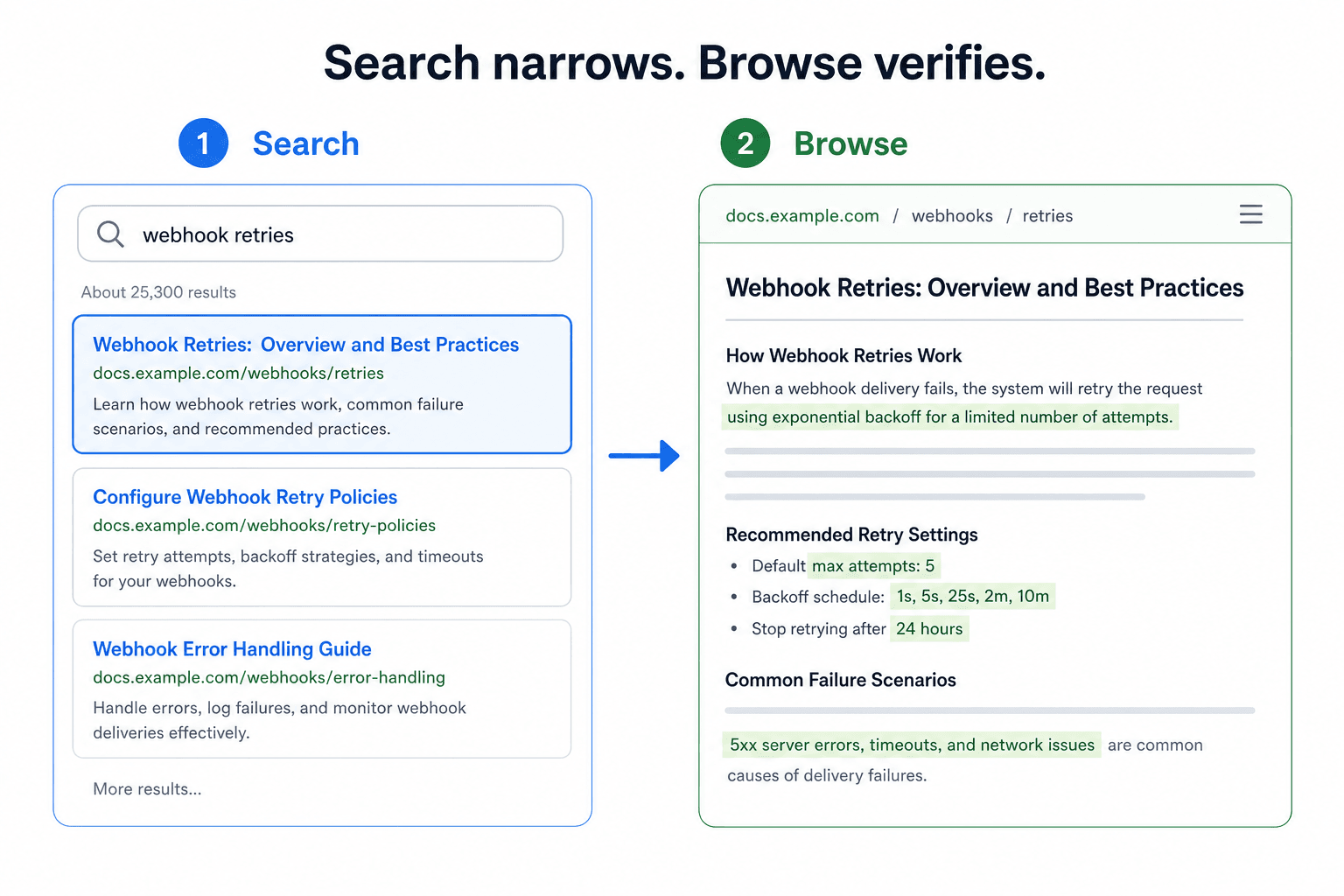 "Search narrows. Browse verifies." — a results list, then a specific doc page
Benchmark: Token Cost on a 2,000-File Codebase
We tested this retrieval pattern on a 2,000-file codebase.
In a 24-task CodeSearchNet-style file-finding benchmark, a native shell-based agent used an average of 962 tokens for retrieval and found the correct target in 22 out of 24 tasks.
With MFS’s search-and-browse loop, average token use dropped to 460 tokens, while the final correct-file result improved to 23 out of 24.
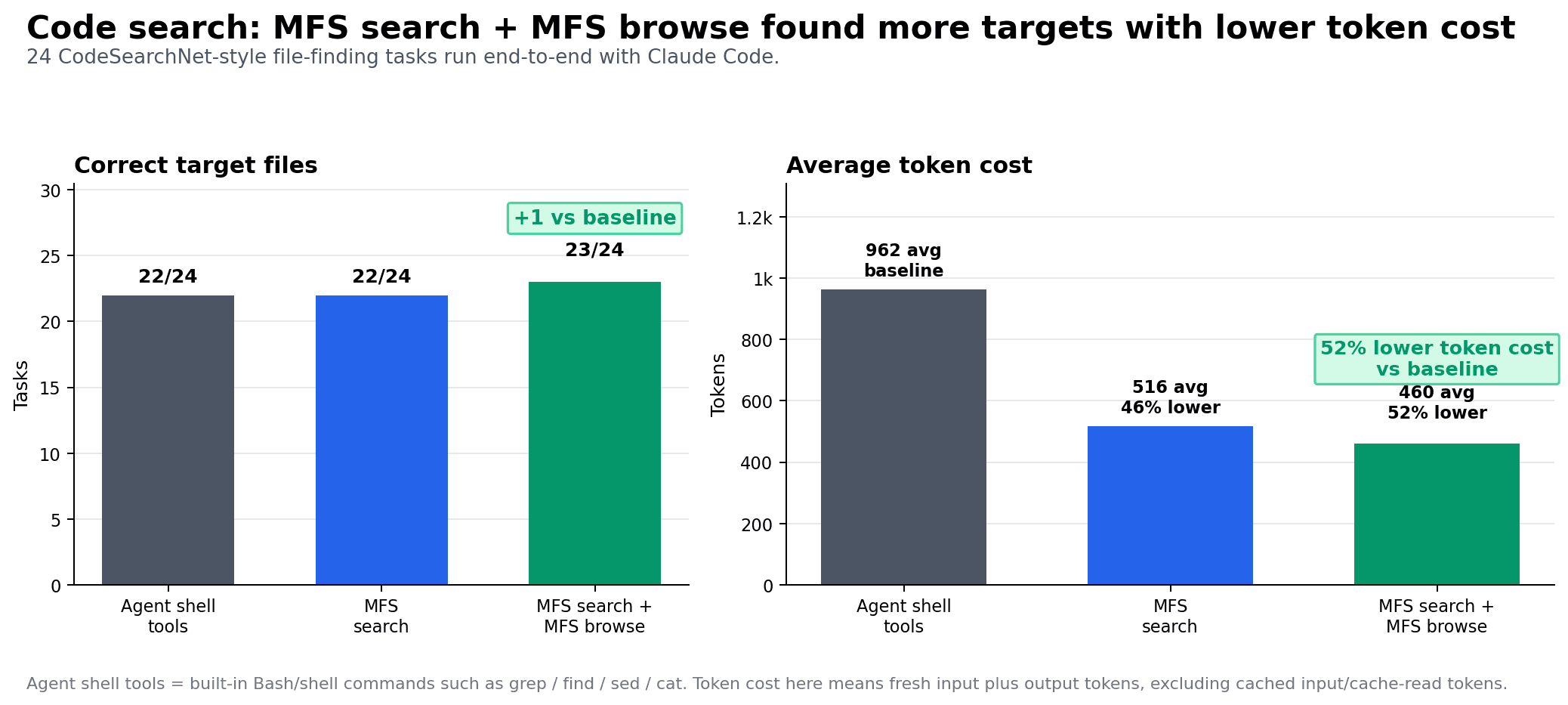 24 CodeSearchNet-style file-finding tasks run end to end with Claude Code, scored on whether the agent's final file was correct (a correct-file rate, not retrieval recall). Token counts are fresh input plus output, excluding cache reads; n = 24 per arm.
Benchmark chart: MFS search plus browse found more correct target files with lower average token cost.
A few details matter:
- The score is the agent’s final correct file, not pure retrieval recall.
- Token counts include fresh input plus output.
- Cache reads are excluded.
- Each arm ran 24 tasks.
- The repo includes harder sets as well, including a tougher code-search task and a document-search task.
The takeaway is not that every workload will see the same reduction. The useful result is that the search/browse loop gives the agent a controllable way to retrieve context: broad enough to find candidates, narrow enough to avoid stuffing full files into the prompt.
That is the core MFS pattern.
One interface to reach every source. Search to find candidates. Browse to verify the exact slice.
All-Source Retrieval: One Query Across Scattered Systems
Once sources share the same interface, MFS can search across all registered sources with one flag:
mfs search "what do we already have related to hybrid retrieval right now?" --all
That query can return results from code, databases, docs, web pages, tickets, and chat history in the same format.
For example:
postgres://prod/public/engineering_tickets/rows.jsonl   score=0.88
   #482 hybrid retrieval flaky on long queries — dense recall drops near ...
notion://workspace/design/retrieval-rfc.md              score=0.85
   Hybrid search: combine dense + sparse, fuse with weighted RRF ...
web://milvus-tutorials/hybrid-search                    score=0.81
   Hybrid search runs an ANN search and a BM25 search, then reranks ...
file://local/repo/src/milvus.py                         score=0.76
   423  def hybrid_search(self, query: str, top_k: int = 10):
github://your-org/bootcamp/notebooks                    score=0.69
   bootcamp/hybrid_search.ipynb — end-to-end hybrid retrieval walkthrough
One command lines up material that used to live in separate systems:
- feedback in engineering tickets;
- design decisions in internal docs;
- official tutorials;
- implementation code;
- example notebooks.
Inside an agent workflow, this becomes more than a result list. The agent can open the relevant hits, compare them, synthesize the evidence, and answer from the original sources.
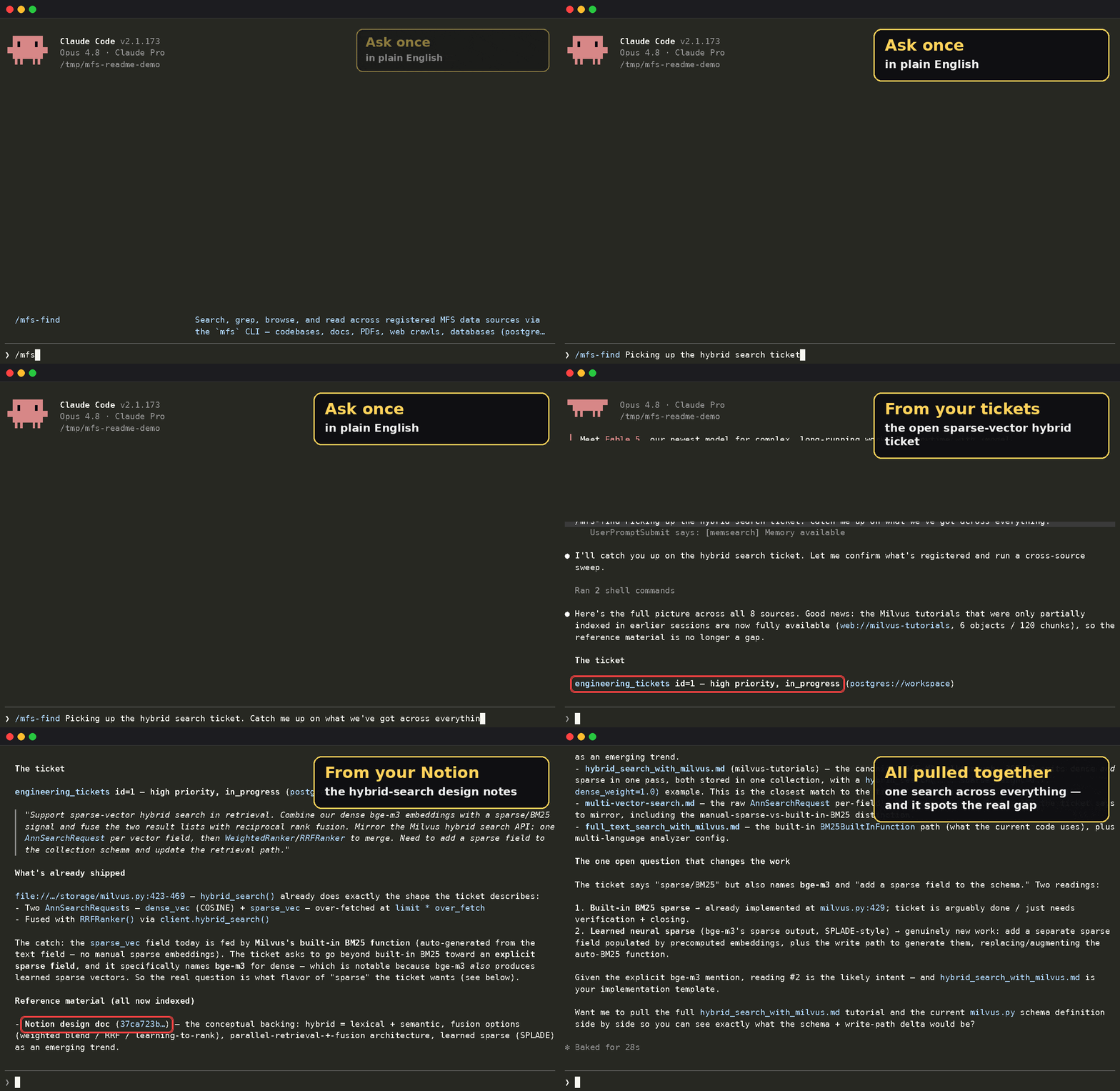 All-source search across tickets, docs, tutorials, code, and examples.
MFS currently supports more than 20 mainstream source types:
| Source | Category | URI prefix | What gets indexed |
|---|---|---|---|
| Local files | Files | file:// | Folders, text, code, PDFs, docx, images |
| Amazon S3 | Object storage | s3:// | Bucket objects converted to text; compatible with R2, GCS, and MinIO |
| Google Drive | Cloud drive | gdrive:// | Docs, Sheets, PDFs, and Drive files |
| PostgreSQL | Database | postgres:// | Tables and rows as searchable records |
| MySQL | Database | mysql:// | Tables and rows |
| MongoDB | Database | mongo:// | Collections and documents |
| BigQuery | Data warehouse | bigquery:// | Datasets and tables |
| Snowflake | Data warehouse | snowflake:// | Databases and tables |
| GitHub | Code / issues | github:// | Repo files, issues, PRs |
| Jira | Issue tracking | jira:// | Projects, issues, comments |
| Linear | Issue tracking | linear:// | Teams, issues, comments |
| HubSpot | CRM | hubspot:// | Contacts, companies, deals, notes |
| Zendesk | Support | zendesk:// | Tickets and comments |
| Slack | Chat | slack:// | Channels and message history |
| Discord | Chat | discord:// | Servers, channels, threads |
| Gmail | gmail:// | Email threads and messages | |
| Feishu / Lark | Chat / docs | feishu:// | Documents and messages |
| Notion | Docs | notion:// | Pages and databases |
| Web | Web pages | web:// | Crawled pages converted to Markdown |
These systems differ in both format and business meaning. A Slack thread, a GitHub PR, a database row, a PDF page, and a Notion doc are not the same type of object.
MFS hides those physical differences. It converts documents to text, images to descriptions, table rows to structured records, and message threads to searchable objects. From the agent’s point of view, they stay one namespace, driven by one set of commands.
That is what makes cross-source search useful. The agent can search, read, and cite across systems without learning a new access pattern for each connector.
The Base-Layer Plumbing MFS Handles
Search quality is only useful if the underlying sources stay fresh and consistent.
MFS handles the system work underneath retrieval:
- authentication;
- incremental sync;
- document parsing and conversion;
- chunking;
- embedding reuse;
- index and metadata consistency;
- caching;
- deletion cleanup;
- recovery from interrupted tasks.
Incremental sync is worth calling out.
Every source has a different way to detect change. Databases may use updated_at. Chat systems rely on message cursors. Local folders compare file hashes. SaaS systems expose their own APIs, pagination, and change-tracking behavior.
MFS normalizes those differences. It works out how to sync each connector and reports the result uniformly as added, changed, or deleted.
That same abstraction makes connector development cheaper. If you want to add a new source, you do not rewrite the retrieval pipeline. You describe what the source contains, how to read it, and how to detect changes. MFS handles conversion, sync, embedding, indexing, caching, and search.
This is the unglamorous part of the system, but it is what makes the agent workflow reliable. A Slack bot demo can be written quickly. A memory layer that keeps many sources usable over time needs this plumbing.
Architecture Elasticity: Local First, Production Later
MFS uses a client/server architecture. The vector store, metadata store, and cache are decoupled so the same workflow can run locally for a demo and scale out for production.
For a local developer demo, MFS can run in a lightweight mode:
- Milvus Lite for vectors;
- SQLite for metadata;
- a local ONNX embedding model of about 600 MB;
- no cloud API key;
- no GPU.
That makes it possible to start on a single machine.
For production, the backend components can be swapped out:
- vectors can point to Zilliz Cloud;
- metadata can move to PostgreSQL;
- the server can run as a containerized service;
- deployment can scale through Kubernetes.
The agent-facing workflow does not need to change. The same mfs-ingest and mfs-find skills can guide setup, connect sources, and search across them.
For example:
Use mfs-ingest to add this local repo first. I just want to get a demo running as fast as possible.
Connect Slack and Jira for me. Where should the token go, and which fields should not be stored in plaintext? Walk me through it step by step.
I want to deploy MFS the production way: Zilliz Cloud for the vector store, Postgres for metadata, and Docker Compose for the server.
Check which connectors are already configured, then use mfs-find to search for background on webhook retry.
The user states the goal. The agent uses the skill to choose the path.
That is the point of exposing MFS as agent-native tooling. The agent can help with setup, but it can also use the same interface later to retrieve and verify context during real work.
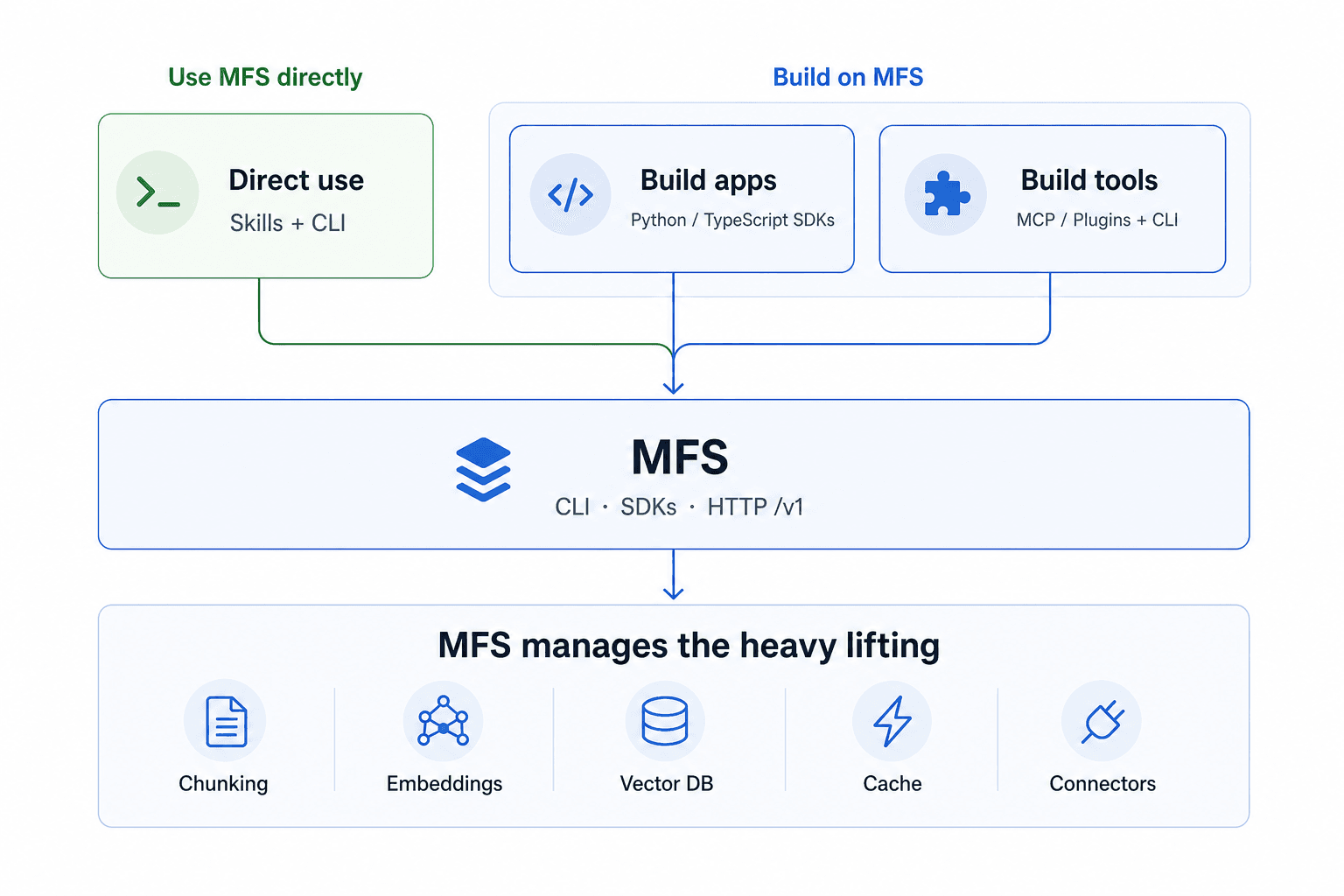 Use MFS directly, build apps on MFS, or build tools with MFS underneath.
Build Your Own Open Tag on MFS
Open Tag is only one reference app.
MFS is not just a search tool for a single developer. It is a foundation for building agent applications.
With the CLI and SDK MFS exposes, you can build your own Slack agent, plugin, MCP server, skill, or internal workflow on top of the same memory and tools layer.
The pattern is reusable:
- Connect the sources the agent needs.
- Expose them as stable URI trees.
- Use search to find candidate context.
- Use browse to verify source material.
- Let the agent answer or act from grounded context.
Open Tag is the smallest useful demo of that pattern: a Slack interface backed by real cross-source context.
From the outside, it looks like a Slack coworker. Underneath, it is an agent that can search, browse, and act across the systems where work already happens.
Closing Thoughts
Over the past few years, as model reasoning improved, more of the industry has moved toward agent harnesses, persistent memory, and skill management.
The names vary, but the underlying problem is the same: how do we make models fit reliably into real production workflows?
That is also the motivation behind Zilliz Vector Lakebase. Semantic data should not fragment into separate islands for real-time retrieval, interactive exploration, and batch analysis. It should sit on a unified lake-native foundation.
MFS is that idea applied to agents.
It gives an agent a way to reach real-world context, organize it, search it cheaply, browse it progressively, and keep it fresh as sources change. Instead of waiting for a human to paste context into the prompt, the agent can find, verify, and use the context it needs.
That is the step from tool to coworker.
Try MFS and Open Tag:
If you want to use MFS with a managed vector layer in production, you can point it at Zilliz Cloud. Work-email signups get free credits. Already have an account? Sign in.
- Open Tag in Action
- What We Actually Rebuilt
- MFS: The Memory and Tools Layer Behind Open Tag
- 1. One URI Interface Across Heterogeneous Sources
- 2. Search to Narrow, Browse to Verify
- Benchmark: Token Cost on a 2,000-File Codebase
- All-Source Retrieval: One Query Across Scattered Systems
- The Base-Layer Plumbing MFS Handles
- Architecture Elasticity: Local First, Production Later
- Build Your Own Open Tag on MFS
- Closing Thoughts
On This Page
Try Managed Milvus for Free
Zilliz Cloud is hassle-free, powered by Milvus and 10x faster.
Get Started




Like the article? Spread the word