

Phrase Match with Slop in Milvus 2.6: How to Improve Phrase-Level Full-Text Search Accuracy
As unstructured data continues to explode and AI models keep getting smarter, vector search has become the default retrieval layer for many AI systems—RAG pipelines, AI search, agents, recommendation engines, and more. It works because it captures meaning: not just the words users type, but the intent behind them.
Once these applications move into production, however, teams often discover that semantic understanding is only one side of the retrieval problem. Many workloads also depend on strict textual rules—such as matching exact terminology, preserving word order, or identifying phrases that carry technical, legal, or operational significance.
Milvus 2.6 removes that split by introducing native full-text search directly into the vector database. With token and positional indexes built into the core engine, Milvus can interpret a query’s semantic intent while enforcing precise keyword and phrase-level constraints. The result is a unified retrieval pipeline in which meaning and structure reinforce each other rather than living in separate systems.
Phrase Match is a key part of this full-text capability. It identifies sequences of terms that appear together and in order—crucial for detecting log patterns, error signatures, product names, and any text in which word order defines meaning. In this post, we’ll explain how Phrase Match works in Milvus, how slop adds flexibility needed for real-world text, and why these features make hybrid vector–full-text search not just possible but practical within a single database.
What is Phrase Match?
Phrase Match is a full-text query type in Milvus that focuses on structure—specifically, whether a sequence of words appears in the same order inside a document. When no flexibility is allowed, the query behaves strictly: the terms must appear next to each other and in sequence. A query like “robotics machine learning” therefore matches only when those three words occur as a continuous phrase.
The challenge is that real text rarely behaves this neatly. Natural language introduces noise: extra adjectives slip in, logs reorder fields, product names gain modifiers, and human authors don’t write with query engines in mind. A strict phrase match breaks easily—one inserted word, one rephrasing, or one swapped term can cause a miss. And in many AI systems, especially production-facing ones, missing a relevant log line or rule-triggering phrase isn’t acceptable.
Milvus 2.6 addresses this friction with a simple mechanism: slop. Slop defines the amount of wiggle room allowed between query terms. Instead of treating a phrase as brittle and inflexible, slop lets you decide whether one extra word is tolerable, or two, or even whether slight reordering should still count as a match. This moves phrase search from a binary pass–fail test to a controlled, tunable retrieval tool.
To see why this matters, imagine searching logs for all variants of the familiar networking error “connection reset by peer.” In practice, your logs might look like:
connection reset by peer
connection fast reset by peer
connection was suddenly reset by the peer
peer reset connection by ...
peer unexpected connection reset happened
At a glance, all of these represent the same underlying event. But common retrieval methods struggle:
BM25 struggles with structure.
It views the query as a bag of keywords, ignoring the order in which they appear. As long as “connection” and “peer” show up somewhere, BM25 may rank the document highly—even if the phrase is reversed or unrelated to the concept you’re actually searching for.
Vector search struggles with constraints.
Embeddings excel at capturing meaning and semantic relationships, but they cannot enforce a rule like “these words must appear in this sequence.” You might retrieve semantically related messages, but still miss the exact structural pattern required for debugging or compliance.
Phrase Match fills the gap between these two approaches. By using slop, you can specify exactly how much variation is acceptable:
slop = 0— Exact match (All terms must appear contiguously and in order.)slop = 1— Allow one extra word (Covers common natural-language variations with a single inserted term.)slop = 2— Allow multiple inserted words (Handles more descriptive or verbose phrasing.)slop = 3— Allow reordering (Supports reversed or loosely ordered phrases, often the hardest case in real-world text.)
Instead of hoping the scoring algorithm “gets it right,” you explicitly declare the structural tolerance your application requires.
How Phrase Match Works in Milvus
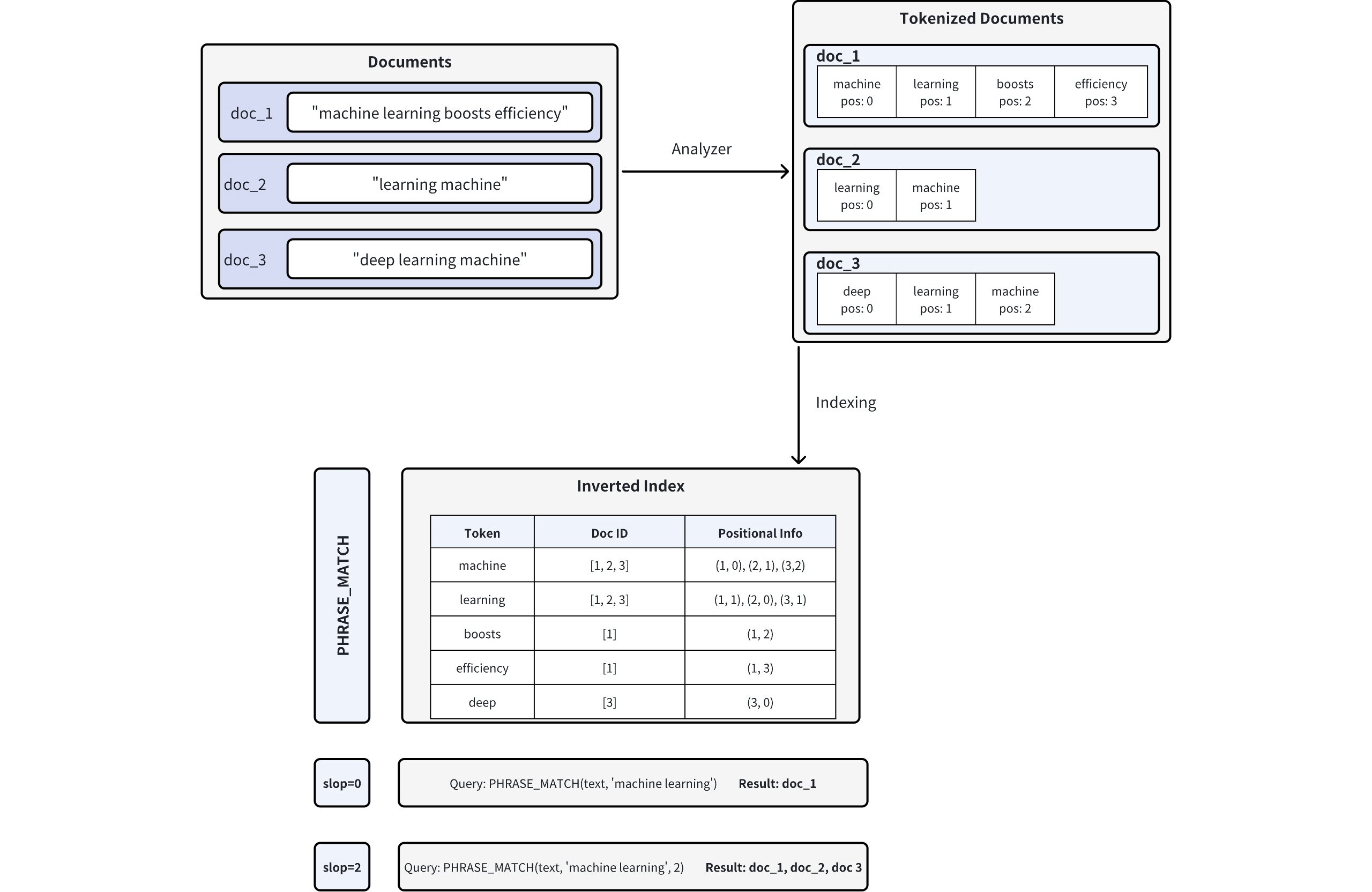
Powered by the Tantivy search engine library, Phrase Match in Milvus is implemented on top of an inverted index with positional information. Instead of only checking whether terms appear in a document, it verifies that they appear in the right order and within a controllable distance.
The diagram below illustrates the process:
1. Document Tokenization (with Positions)
When documents are inserted into Milvus, text fields are processed by an analyzer, which splits the text into tokens (words or terms) and records each token’s position within the document. For example, doc_1 is tokenized as: machine (pos=0), learning (pos=1), boosts (pos=2), efficiency (pos=3).
2. Inverted Index Creation
Next, Milvus builds an inverted index. Instead of mapping documents to their contents, the inverted index maps each token to the documents in which it appears, along with all recorded positions of that token within each document.
3. Phrase Matching
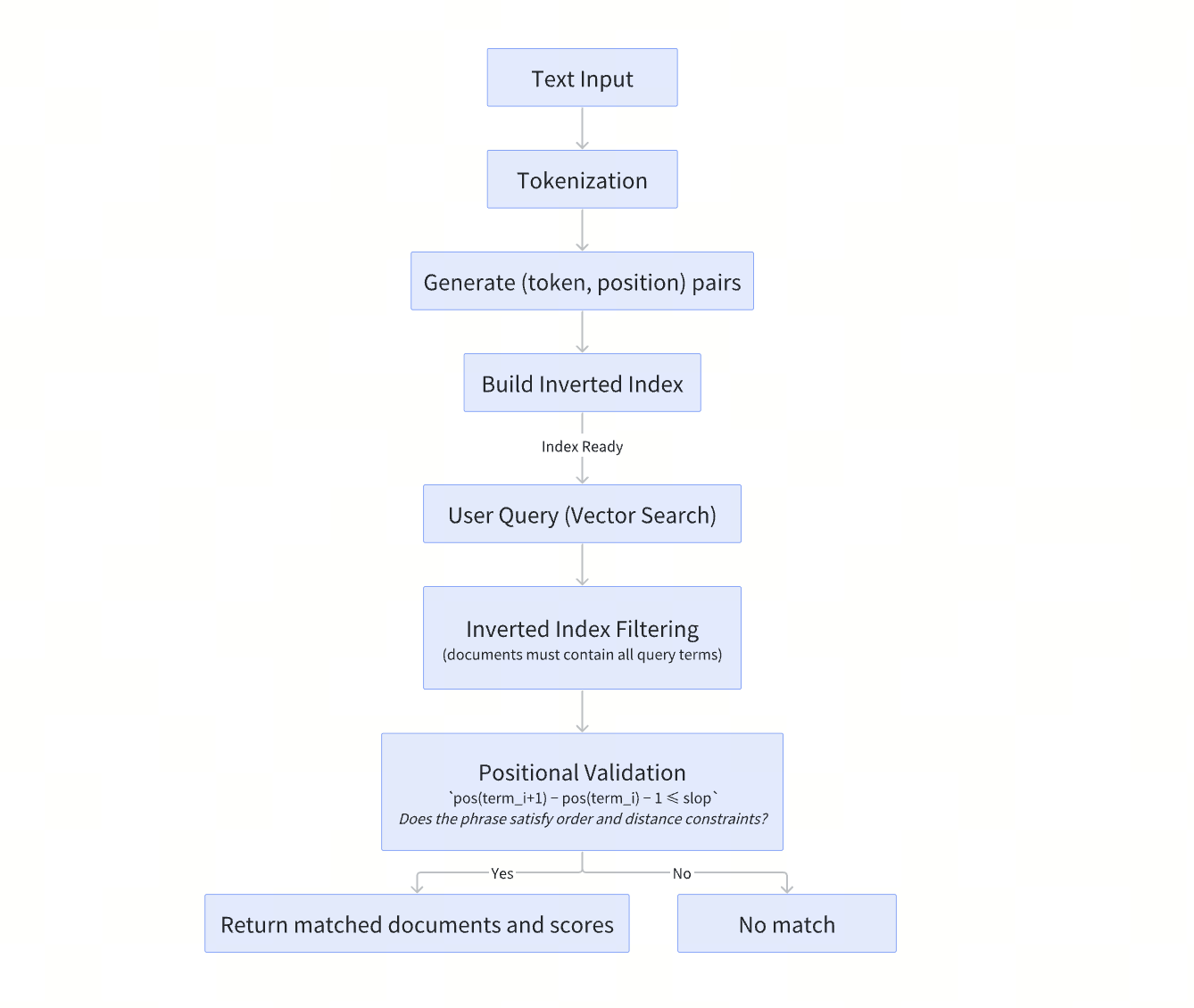
When a phrase query is executed, Milvus first uses the inverted index to identify documents that contain all query tokens. It then validates each candidate by comparing token positions to ensure the terms appear in the correct order and within the allowed slop distance. Only documents that satisfy both conditions are returned as matches.
The diagram below summarizes how Phrase Match works end-to-end.
How to Enable Phrase Match in Milvus
Phrase Match works on fields of type VARCHAR, the string type in Milvus. To use it, you must configure your collection schema so that Milvus performs text analysis and stores positional information for the field. This is done by enabling two parameters: enable_analyzer and enable_match.
Set enable_analyzer and enable_match
To turn on Phrase Match for a specific VARCHAR field, set both parameters to True when defining the field schema. Together, they tell Milvus to:
tokenize the text (via
enable_analyzer), andbuild an inverted index with positional offsets (via
enable_match).
Phrase Match relies on both steps: the analyzer breaks text into tokens, and the match index stores where those tokens appear, enabling efficient phrase and slop-based queries.
Below is an example schema configuration that enables Phrase Match on a text field:
from pymilvus import MilvusClient, DataType

schema = MilvusClient.create_schema(enable_dynamic_field=False)
schema.add_field(
    field_name="id",
    datatype=DataType.INT64,
    is_primary=True,
    auto_id=True
)
schema.add_field(
    field_name='text',                 # Name of the field
    datatype=DataType.VARCHAR,         # Field data type set as VARCHAR (string)
    max_length=1000,                   # Maximum length of the string
    enable_analyzer=True,              # Enables text analysis (tokenization)
    enable_match=True                  # Enables inverted indexing for phrase matching
)
schema.add_field(
    field_name="embeddings",
    datatype=DataType.FLOAT_VECTOR,
    dim=5
)
Search with Phrase Match: How Slop Affects the Candidate Set
Once you’ve enabled match for a VARCHAR field in your collection schema, you can perform phrase matches using the PHRASE_MATCH expression.
Note: The PHRASE_MATCH expression is case-insensitive. You can use either PHRASE_MATCH or phrase_match.
In search operations, Phrase Match is commonly applied before vector similarity ranking. It first filters documents based on explicit textual constraints, narrowing the candidate set. The remaining documents are then re-ranked using vector embeddings.
The example below shows how different slop values affect this process. By adjusting the slop parameter, you directly control which documents pass the phrase filter and proceed to the vector ranking stage.
Suppose you have a collection named tech_articles containing the following five entities:
| doc_id | text |
|---|---|
| 1 | Machine learning boosts efficiency in large-scale data analysis |
| 2 | Learning a machine-based approach is vital for modern AI progress |
| 3 | Deep learning machine architectures optimize computational loads |
| 4 | Machine swiftly improves model performance for ongoing learning |
| 5 | Learning advanced machine algorithms expands AI capabilities |
slop=1
Here, we allow a slop of 1. The filter is applied to documents that contain the phrase “learning machine” with slight flexibility.
# Example: Filter documents containing "learning machine" with slop=1
filter_slop1 = "PHRASE_MATCH(text, 'learning machine', 1)"

result_slop1 = client.search(
    collection_name="tech_articles",
    anns_field="embeddings",
    data=[query_vector],
    filter=filter_slop1,
    search_params={"params": {"nprobe": 10}},
    limit=10,
    output_fields=["id", "text"]
)
Match results:
| doc_id | text |
|---|---|
| 2 | Learning a machine-based approach is vital for modern AI progress |
| 3 | Deep learning machine architectures optimize computational loads |
| 5 | Learning advanced machine algorithms expands AI capabilities |
slop=2
This example allows a slop of 2, meaning that up to two extra tokens (or reversed terms) are allowed between the words “machine” and “learning”.
# Example: Filter documents containing "machine learning" with slop=2
filter_slop2 = "PHRASE_MATCH(text, 'machine learning', 2)"

result_slop2 = client.search(
    collection_name="tech_articles",
    anns_field="embeddings",             # Vector field name
    data=[query_vector],                 # Query vector
    filter=filter_slop2,                 # Filter expression
    search_params={"params": {"nprobe": 10}},
    limit=10,                            # Maximum results to return
    output_fields=["id", "text"]
)
Match results:
| doc_id | text |
|---|---|
| 1 | Machine learning boosts efficiency in large-scale data analysis |
| 3 | Deep learning machine architectures optimize computational loads |
slop=3
In this example, a slop of 3 provides even more flexibility. The filter searches for “machine learning” with up to three token positions allowed between the words.
# Example: Filter documents containing "machine learning" with slop=3
filter_slop3 = "PHRASE_MATCH(text, 'machine learning', 3)"

result_slop2 = client.search(
    collection_name="tech_articles",
    anns_field="embeddings",             # Vector field name
    data=[query_vector],                 # Query vector
    filter=filter_slop3,                 # Filter expression
    search_params={"params": {"nprobe": 10}},
    limit=10,                            # Maximum results to return
    output_fields=["id", "text"]
)
Match results:
| doc_id | text |
|---|---|
| 1 | Machine learning boosts efficiency in large-scale data analysis |
| 2 | Learning a machine-based approach is vital for modern AI progress |
| 3 | Deep learning machine architectures optimize computational loads |
| 5 | Learning advanced machine algorithms expands AI capabilities |
Quick Tips: What You Need to Know Before Enabling Phrase Match in Milvus
Phrase Match provides support for phrase-level filtering, but enabling it involves more than query-time configuration. It is helpful to be aware of the associated considerations before applying it in a production setting.
Enabling Phrase Match on a field creates an inverted index, which increases storage usage. The exact cost depends on factors such as text length, the number of unique tokens, and the analyzer configuration. When working with large text fields or high-cardinality data, this overhead should be considered upfront.
Analyzer configuration is another critical design choice. Once an analyzer is defined in the collection schema, it cannot be changed. Switching to a different analyzer later requires dropping the existing collection and recreating it with a new schema. For this reason, analyzer selection should be treated as a long-term decision rather than an experiment.
Phrase Match behavior is tightly coupled to how text is tokenized. Before applying an analyzer to an entire collection, it is recommended to use the
run_analyzermethod to inspect the tokenization output and confirm that it matches your expectations. This step can help avoid subtle mismatches and unexpected query results later. For more information, refer to Analyzer Overview.
Conclusion
Phrase Match is a core full-text search type that enables phrase-level and positional constraints beyond simple keyword matching. By operating on token order and proximity, it provides a predictable and precise way to filter documents based on how terms actually appear in text.
In modern retrieval systems, Phrase Match is commonly applied before vector-based ranking. It first restricts the candidate set to documents that explicitly satisfy required phrases or structures. Vector search is then used to rank these results by semantic relevance. This pattern is especially effective in scenarios such as log analysis, technical documentation search, and RAG pipelines, where textual constraints must be enforced before semantic similarity is considered.
With the introduction of the slop parameter in Milvus 2.6, Phrase Match becomes more tolerant of natural language variation while retaining its role as a full-text filtering mechanism. This makes phrase-level constraints easier to apply in production retrieval workflows.
👉 Try it out with the demo scripts, and explore Milvus 2.6 to see how phrase-aware retrieval fits into your stack.
Have questions or want a deep dive on any feature of the latest Milvus? Join our Discord channel or file issues on GitHub. You can also book a 20-minute one-on-one session to get insights, guidance, and answers to your questions through Milvus Office Hours.
- What is Phrase Match?
- BM25 struggles with structure.
- Vector search struggles with constraints.
- How Phrase Match Works in Milvus
- How to Enable Phrase Match in Milvus
- Set enable_analyzer and enable_match
- Search with Phrase Match: How Slop Affects the Candidate Set
- Quick Tips: What You Need to Know Before Enabling Phrase Match in Milvus
- Conclusion
On This Page
Try Managed Milvus for Free
Zilliz Cloud is hassle-free, powered by Milvus and 10x faster.
Get StartedLike the article? Spread the word