
Unlocking True Entity-Level Retrieval: New Array-of-Structs and MAX_SIM Capabilities in Milvus
If you’ve built AI applications on top of vector databases, you’ve probably hit the same pain point: the database retrieves embeddings of individual chunks, but your application cares about entities. The mismatch makes the entire retrieval workflow complex.
You’ve likely seen this play out again and again:
RAG knowledge bases: Articles are chunked into paragraph embeddings, so the search engine returns scattered fragments instead of the complete document.
E-commerce recommendation: A product has multiple image embeddings, and your system returns five angles of the same item rather than five unique products.
Video platforms: Videos are split into clip embeddings, but search results surface slices of the same video rather than a single consolidated entry.
ColBERT / ColPali–style retrieval: Documents expand into hundreds of token or patch-level embeddings, and your results come back as tiny pieces that still require merging.
All of these issues stem from the same architectural gap: most vector databases treat each embedding as an isolated row, while real applications operate on higher-level entities — documents, products, videos, items, scenes. As a result, engineering teams are forced to reconstruct entities manually using deduplication, grouping, bucketing, and reranking logic. It works, but it’s fragile, slow, and bloats your application layer with logic that should never have lived there in the first place.
Milvus 2.6.4 closes this gap with a new feature: Array of Structs with the MAX_SIM metric type. Together, they allow all embeddings for a single entity to be stored in a single record and enable Milvus to score and return the entity holistically. No more duplicate-filled result sets. No more complex post-processing like reranking and merging
In this article, we’ll walk through how Array of Structs and MAX_SIM work—and demonstrate them through two real examples: Wikipedia document retrieval and ColPali image-based document search.
What is an Array of Structs?
In Milvus, an Array of Structs field allows a single record to contain an ordered list of Struct elements, each following the same predefined schema. A Struct can hold multiple vectors as well as scalar fields, strings, or any other supported types. In other words, it lets you bundle all the pieces that belong to one entity—paragraph embeddings, image views, token vectors, metadata—directly inside one row.
Here’s an example of an entity from a collection that contains an Array of Structs field.
{
    'id': 0,
    'title': 'Walden',
    'title_vector': [0.1, 0.2, 0.3, 0.4, 0.5],
    'author': 'Henry David Thoreau',
    'year_of_publication': 1845,
    'chunks': [
        {
            'text': 'When I wrote the following pages, or rather the bulk of them...',
            'text_vector': [0.3, 0.2, 0.3, 0.2, 0.5],
            'chapter': 'Economy',
        },
        {
            'text': 'I would fain say something, not so much concerning the Chinese and...',
            'text_vector': [0.7, 0.4, 0.2, 0.7, 0.8],
            'chapter': 'Economy'
        }
    ]
    // hightlight-end
}
In the example above, the chunks field is an Array of Structs field, and each Struct element contains its own fields, namely text, text_vector, and chapter.
This approach solves a long-standing modeling issue in vector databases. Traditionally, every embedding or attribute has to become its own row, which forces multi-vector entities (documents, products, videos) to be split into dozens, hundreds, or even thousands of records. With Array of Structs, Milvus lets you store the entire multi-vector entity in a single field, making it a natural fit for paragraph lists, token embeddings, clip sequences, multi-view images, or any scenario where one logical item is composed of many vectors.
How Does an Array of Structs Work with MAX_SIM?
Layered on top of this new array of structs structure is MAX_SIM, a new scoring strategy that makes semantic retrieval entity-aware. When a query comes in, Milvus compares it against every vector inside each Array of Structs and takes the maximum similarity as the entity’s final score. The entity is then ranked—and returned—based on that single score. This avoids the classic vector-database problem of retrieving scattered fragments and pushing the burden of grouping, deduping, and reranking into the application layer. With MAX_SIM, entity-level retrieval becomes built-in, consistent, and efficient.
To understand how MAX_SIM works in practice, let’s walk through a concrete example.
Note: All vectors in this example are generated by the same embedding model, and similarity is measured with cosine similarity in the [0,1] range.
Suppose a user searches for “Machine Learning Beginner Course.”
The query is tokenized into three tokens:
Machine learning
beginner
course
Each of these tokens is then converted into an embedding vector by the same embedding model used for the documents.
Now, imagine the vector database contains two documents:
doc_1: An Introduction Guide to Deep Neural Networks with Python
doc_2: An Advanced Guide to LLM Paper Reading
Both documents have been embedded into vectors and stored inside an Array of Structs.
Step 1: Compute MAX_SIM for doc_1
For each query vector, Milvus computes its cosine similarity against every vector in doc_1:
| Introduction | guide | deep neural networks | python | |
|---|---|---|---|---|
| machine learning | 0.0 | 0.0 | 0.9 | 0.3 |
| beginner | 0.8 | 0.1 | 0.0 | 0.3 |
| course | 0.3 | 0.7 | 0.1 | 0.1 |
For each query vector, MAX_SIM selects the highest similarity from its row:
machine learning → deep neural networks (0.9)
beginner → introduction (0.8)
course → guide (0.7)
Summing the best matches gives doc_1 a MAX_SIM score of 2.4.
Step 2: Compute MAX_SIM for doc_2
Now we repeat the process for doc_2:
| advanced | guide | LLM | paper | reading | |
|---|---|---|---|---|---|
| machine learning | 0.1 | 0.2 | 0.9 | 0.3 | 0.1 |
| beginner | 0.4 | 0.6 | 0.0 | 0.2 | 0.5 |
| course | 0.5 | 0.8 | 0.1 | 0.4 | 0.7 |
The best matches for doc_2 are:
“machine learning” → “LLM” (0.9)
“beginner” → “guide” (0.6)
“course” → “guide” (0.8)
Summing them gives doc_2 a MAX_SIM score of 2.3.
Step 3: Compare the Scores
Because 2.4 > 2.3, doc_1 ranks higher than doc_2, which makes intuitive sense, since doc_1 is closer to an introductory machine learning guide.
From this example, we can highlight three core characteristics of MAX_SIM:
Semantic first, not keyword-based: MAX_SIM compares embeddings, not text literals. Even though “machine learning” and “deep neural networks” share zero overlapping words, their semantic similarity is 0.9. This makes MAX_SIM robust to synonyms, paraphrases, conceptual overlap, and modern embedding-rich workloads.
Insensitive to length and order: MAX_SIM does not require the query and document to have the same number of vectors (e.g., doc_1 has 4 vectors while doc_2 has 5, and both work fine). It also ignores vector order—“beginner” appearing earlier in the query and “introduction” appearing later in the document has no impact on the score.
Every query vector matters: MAX_SIM takes the best match for each query vector and sums those best scores. This prevents unmatched vectors from skewing the result and ensures that every important query token contributes to the final score. For example, the lower-quality match for “beginner” in doc_2 directly reduces its overall score.
Why MAX_SIM + Array of Structs Matter in Vector Database
Milvus is an open-source, high-performance vector database and it now fully supports MAX_SIM together with Array of Structs, enabling vector-native, entity-level multi-vector retrieval:
Store multi-vector entities natively: Array of Structs allows you to store groups of related vectors in a single field without splitting them into separate rows or auxiliary tables.
Efficient best-match computation: Combined with vector indexes such as IVF and HNSW, MAX_SIM can compute the best matches without scanning every vector, keeping performance high even with large documents.
Purpose-built for semantic-heavy workloads: This approach excels in long-text retrieval, multi-facet semantic matching, document–summary alignment, multi-keyword queries, and other AI scenarios that require flexible, fine-grained semantic reasoning.
When to Use an Array of Structs
The value of Array of Structs becomes clear when you look at what it enables. At its core, this feature provides three foundational capabilities:
It bundles heterogeneous data—vectors, scalars, strings, metadata—into a single structured object.
It aligns storage with real-world entities, so each database row maps cleanly to an actual item such as an article, a product, or a video.
When combined with aggregate functions like MAX_SIM, it enables true entity-level multi-vector retrieval directly from the database, eliminating deduplication, grouping, or reranking in the application layer.
Because of these properties, Array of Structs is a natural fit whenever a single logical entity is represented by multiple vectors. Common examples include articles split into paragraphs, documents decomposed into token embeddings, or products represented by multiple images. If your search results suffer from duplicate hits, scattered fragments, or the same entity appearing multiple times in the top results, Array of Structs solves these issues at the storage and retrieval layer—not through after-the-fact patching in application code.
This pattern is especially powerful for modern AI systems that rely on multi-vector retrieval. For instance:
ColBERT represents a single document as 100–500 token embeddings for fine-grained semantic matching across domains such as legal text and academic research.
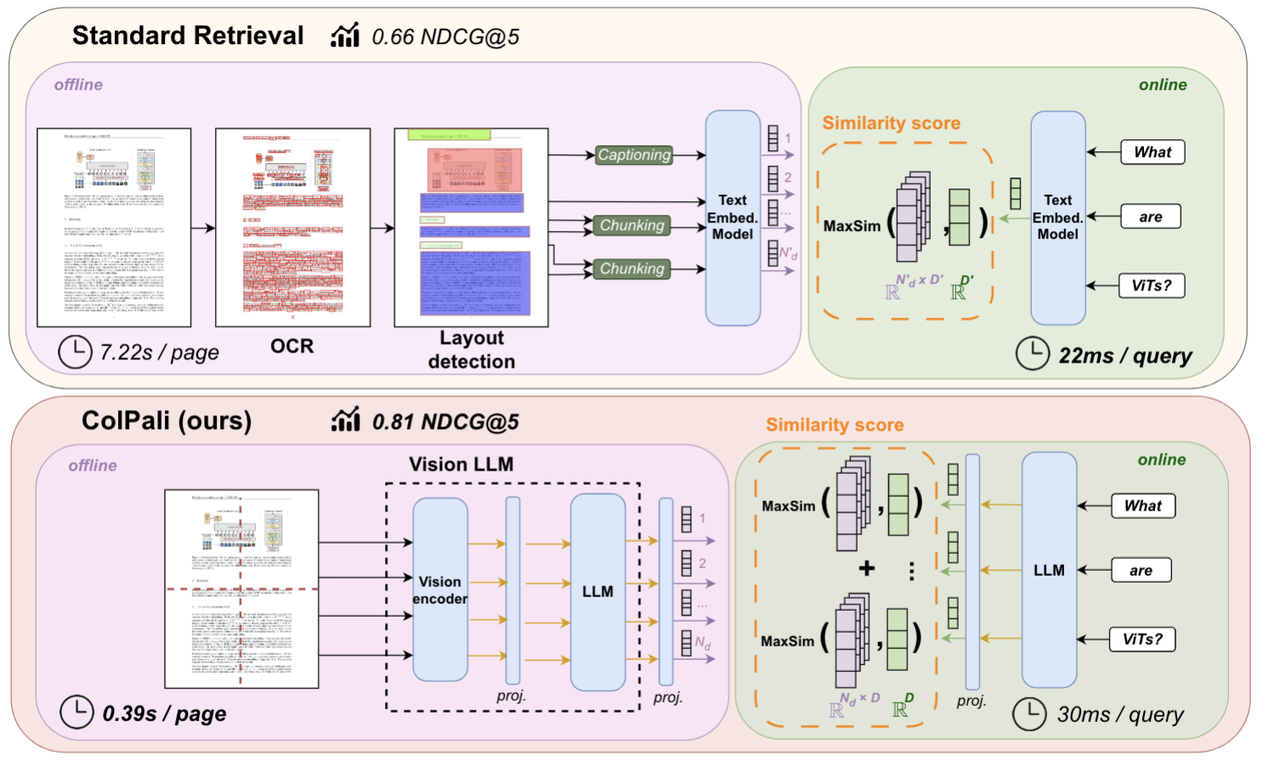
ColPali converts each PDF page into 256–1024 image patches for cross-modal retrieval across financial statements, contracts, invoices, and other scanned documents.
An array of Structs lets Milvus store all these vectors under a single entity and compute aggregate similarity (e.g., MAX_SIM) efficiently and natively. To make this clearer, here are two concrete examples.
Example 1: E-commerce Product Search
Previously, products with multiple images were stored in a flat schema—one image per row. A product with front, side, and angled shots produced three rows. Search results often returned multiple images of the same product, requiring manual deduplication and reranking.
With an Array of Structs, each product becomes one row. All image embeddings and metadata (angle, is_primary, etc.) live inside an images field as an array of structs. Milvus understands they belong to the same product and returns the product as a whole—not its individual images.
Example 2: Knowledge Base or Wikipedia Search
Previously, a single Wikipedia article was split into N paragraph rows. Search results returned scattered paragraphs, forcing the system to group them and guess which article they belonged to.
With an Array of Structs, the entire article becomes one row. All paragraphs and their embeddings are grouped under a paragraphs field, and the database returns the full article, not fragmented pieces.
Hands-on Tutorials: Document-Level Retrieval with the Array of Structs
1. Wikipedia Document Retrieval
In this tutorial, we’ll walk through how to use an Array of Structs to convert paragraph-level data into full document records—allowing Milvus to perform true document-level retrieval rather than returning isolated fragments.
Many knowledge base pipelines store Wikipedia articles as paragraph chunks. This works well for embedding and indexing, but it breaks retrieval: a user query typically returns scattered paragraphs, forcing you to manually group and reconstruct the article. With an Array of Structs and MAX_SIM, we can redesign the storage schema so that each article becomes one row, and Milvus can rank and return the entire document natively.
In the next steps, we’ll show how to:
Load and preprocess Wikipedia paragraph data
Bundle all paragraphs belonging to the same article into an Array of Structs
Insert these structured documents into Milvus
Run MAX_SIM queries to retrieve full articles—cleanly, without deduping or reranking
By the end of this tutorial, you’ll have a working pipeline where Milvus handles entity-level retrieval directly, exactly the way users expect.
Data Model:
{
    "wiki_id": int,                  # WIKI ID(primary key)
    "paragraphs": ARRAY<STRUCT<      # Array of paragraph structs
        text:VARCHAR                 # Paragraph text
        emb: FLOAT_VECTOR(768)       # Embedding for each paragraph
    >>
}
Step 1: Group and Transform the Data
For this demo, we use the Simple Wikipedia Embeddings dataset.
import pandas as pd
import pyarrow as pa

# Load the dataset and group by wiki_id
df = pd.read_parquet("train-*.parquet")
grouped = df.groupby('wiki_id')

# Build the paragraph array for each article
wiki_data = []
for wiki_id, group in grouped:
    wiki_data.append({
        'wiki_id': wiki_id,
        'paragraphs': [{'text': row['text'], 'emb': row['emb']}
                       for _, row in group.iterrows()]
    })
Step 2: Create the Milvus Collection
from pymilvus import MilvusClient, DataType

client = MilvusClient(uri="http://localhost:19530")
schema = client.create_schema()
schema.add_field("wiki_id", DataType.INT64, is_primary=True)

# Define the Struct schema
struct_schema = client.create_struct_field_schema()
struct_schema.add_field("text", DataType.VARCHAR, max_length=65535)
struct_schema.add_field("emb", DataType.FLOAT_VECTOR, dim=768)

schema.add_field("paragraphs", DataType.ARRAY,
                 element_type=DataType.STRUCT,
                 struct_schema=struct_schema, max_capacity=200)

client.create_collection("wiki_docs", schema=schema)
Step 3: Insert Data and Build Index
# Batch insert documents
client.insert("wiki_docs", wiki_data)

# Create an HNSW index
index_params = client.prepare_index_params()
index_params.add_index(
    field_name="paragraphs[emb]",
    index_type="HNSW",
    metric_type="MAX_SIM_COSINE",
    params={"M": 16, "efConstruction": 200}
)
client.create_index("wiki_docs", index_params)
client.load_collection("wiki_docs")
Step 4: Search Documents
# Search query
import cohere
from pymilvus.client.embedding_list import EmbeddingList

# The dataset uses Cohere's multilingual-22-12 embedding model, so we must embed the query using the same model.
co = cohere.Client(f"<<COHERE_API_KEY>>")
query = 'Who founded Youtube'
response = co.embed(texts=[query], model='multilingual-22-12')
query_embedding = response.embeddings
query_emb_list = EmbeddingList()

for vec in query_embedding[0]:
    query_emb_list.add(vec)

results = client.search(
    collection_name="wiki_docs",
    data=[query_emb_list],
    anns_field="paragraphs[emb]",
    search_params={
        "metric_type": "MAX_SIM_COSINE",
        "params": {"ef": 200, "retrieval_ann_ratio": 3}
    },
    limit=10,
    output_fields=["wiki_id"]
)

# Results: directly return 10 full articles!
for hit in results[0]:
    print(f"Article {hit['entity']['wiki_id']}: Score {hit['distance']:.4f}")
Comparing Outputs: Traditional Retrieval vs. Array of Structs
The impact of Array of Structs becomes clear when we look at what the database actually returns:
| Dimension | Traditional Approach | Array of Structs |
|---|---|---|
| Database Output | Returns Top 100 paragraphs (high redundancy) | Returns the top 10 full documents — clean and accurate |
| Application Logic | Requires grouping, deduplication, and reranking (complex) | No post-processing needed — entity-level results come directly from Milvus |
In the Wikipedia example, we demonstrated only the simplest case: combining paragraph vectors into a unified document representation. But the real strength of Array of Structs is that it generalizes to any multi-vector data model—both classic retrieval pipelines and modern AI architectures.
Traditional Multi-Vector Retrieval Scenarios
Many well-established search and recommendation systems naturally operate on entities with multiple associated vectors. Array of Structs maps to these use cases cleanly:
| Scenario | Data Model | Vectors per Entity |
|---|---|---|
| 🛍️ E-commerce products | One product → multiple images | 5–20 |
| 🎬 Video search | One video → multiple clips | 20–100 |
| 📖 Paper retrieval | One paper → multiple sections | 5–15 |
AI Model Workloads (Key Multi-Vector Use Cases)
Array of Structs becomes even more critical in modern AI models that intentionally produce large sets of vectors per entity for fine-grained semantic reasoning.
| Model | Data Model | Vectors per Entity | Application |
|---|---|---|---|
| ColBERT | One document → many token embeddings | 100–500 | Legal text, academic papers, fine-grained document retrieval |
| ColPali | One PDF page → many patch embeddings | 256–1024 | Financial reports, contracts, invoices, multimodal document search |
These models require a multi-vector storage pattern. Before Array of Structs, developers had to split vectors across rows and manually stitch results back together. With Milvus, these entities can now be stored and retrieved natively, with MAX_SIM handling document-level scoring automatically.
2. ColPali Image-Based Document Search
ColPali is a powerful model for cross-modal PDF retrieval. Instead of relying on text, it processes each PDF page as an image and slices it into up to 1024 visual patches, generating one embedding per patch. Under a traditional database schema, this would require storing a single page as hundreds or thousands of separate rows, making it impossible for the database to understand that these rows belong to the same page. As a result, entity-level search becomes fragmented and impractical.
Array of Structs solves this cleanly by storing all patch embeddings inside a single field, allowing Milvus to treat the page as one cohesive multi-vector entity.
Traditional PDF search often depends on OCR, which converts page images into text. This works for plain text but loses charts, tables, layout, and other visual cues. ColPali avoids this limitation by working directly on page images, preserving all visual and textual information. The trade-off is scale: each page now contains hundreds of vectors, which requires a database that can aggregate many embeddings into one entity—exactly what Array of Structs + MAX_SIM provides.
The most common use case is Vision RAG, where each PDF page becomes a multi-vector entity. Typical scenarios include:
Financial reports: searching thousands of PDFs for pages containing specific charts or tables.
Contracts: retrieving clauses from scanned or photographed legal documents.
Invoices: finding invoices by vendor, amount, or layout.
Presentations: locating slides that contain a particular figure or diagram.
Data Model:
{
    "page_id": int,                     # Page ID (primary key)
    "page_number": int,                 # Page number within the document
    "doc_name": VARCHAR,                # Document name
    "patches": ARRAY<STRUCT<            # Array of patch objects
        patch_embedding: FLOAT_VECTOR(128)  # Embedding for each patch
    >>
}
Step 1: Prepare the Data You can refer to the doc for details on how ColPali converts images or text into multi-vector representations.
import torch
from PIL import Image

from colpali_engine.models import ColPali, ColPaliProcessor

model_name = "vidore/colpali-v1.3"

model = ColPali.from_pretrained(
    model_name,
    torch_dtype=torch.bfloat16,
    device_map="cuda:0",  # or "mps" if on Apple Silicon
).eval()

processor = ColPaliProcessor.from_pretrained(model_name)
# Example: 2 documents, 5 pages each, total 10 images
images = [
    Image.open("path/to/your/image1.png"),
    Image.open("path/to/your/image2.png"),
    ....
    Image.open("path/to/your/image10.png")
]
# Convert each image into multiple patch embeddings
batch_images = processor.process_images(images).to(model.device)
with torch.no_grad():
    image_embeddings = model(**batch_images)
Step 2: Create the Milvus Collection
from pymilvus import MilvusClient, DataType

client = MilvusClient(uri="http://localhost:19530")
schema = client.create_schema()
schema.add_field("page_id", DataType.INT64, is_primary=True)
schema.add_field("page_number", DataType.INT64)
schema.add_field("doc_name", DataType.VARCHAR, max_length=500)

# Struct Array for patches
struct_schema = client.create_struct_field_schema()
struct_schema.add_field("patch_embedding", DataType.FLOAT_VECTOR, dim=128)

schema.add_field("patches", DataType.ARRAY,
                 element_type=DataType.STRUCT,
                 struct_schema=struct_schema, max_capacity=2048)

client.create_collection("doc_pages", schema=schema)
Step 3: Insert Data and Build Index
# Prepare data for insertion
page_data=[
    {
        "page_id": 0,
        "page_number": 0,
        "doc_name": "Q1_Financial_Report.pdf",
        "patches": [
            {"patch_embedding": emb} for emb in image_embeddings[0]
        ],
    },
    ...,
    {
        "page_id": 9,
        "page_number": 4,
        "doc_name": "Product_Manual.pdf",
        "patches": [
            {"patch_embedding": emb} for emb in image_embeddings[9]
        ],
    },
]

client.insert("doc_pages", page_data)

# Create index
index_params = client.prepare_index_params()
index_params.add_index(
    field_name="patches[patch_embedding]",
    index_type="HNSW",
    metric_type="MAX_SIM_IP",
    params={"M": 32, "efConstruction": 200}
)
client.create_index("doc_pages", index_params)
client.load_collection("doc_pages")
Step 4: Cross-Modal Search: Text Query → Image Results
# Run the search
from pymilvus.client.embedding_list import EmbeddingList

queries = [
    "quarterly revenue growth chart"
]
# Convert the text query into a multi-vector representation
batch_queries = processor.process_queries(queries).to(model.device)
with torch.no_grad():
    query_embeddings = model(**batch_queries)

query_emb_list = EmbeddingList()
for vec in query_embeddings[0]:
    query_emb_list.add(vec)
results = client.search(
    collection_name="doc_pages",
    data=[query_emb_list],
    anns_field="patches[patch_embedding]",
    search_params={
        "metric_type": "MAX_SIM_IP",
        "params": {"ef": 100, "retrieval_ann_ratio": 3}
    },
    limit=3,
    output_fields=["page_id", "doc_name", "page_number"]
)


print(f"Query: '{queries[0]}'")
for i, hit in enumerate(results, 1):
    entity = hit['entity']
    print(f"{i}. {entity['doc_name']} - Page {entity['page_number']}")
    print(f"   Score: {hit['distance']:.4f}\n")
Sample Output:
Query: 'quarterly revenue growth chart'
1. Q1_Financial_Report.pdf - Page 2
   Score: 0.9123

2. Q1_Financial_Report.pdf - Page 1
   Score: 0.7654

3. Product_Manual.pdf - Page 1
   Score: 0.5231
Here, the results directly return full PDF pages. We don’t need to worry about the underlying 1024 patch embeddings—Milvus handles all the aggregation automatically.
Conclusion
Most vector databases store each fragment as an independent record, which means applications have to reassemble those fragments when they need a full document, product, or page. An array of Structs changes that. By combining scalars, vectors, text, and other fields into a single structured object, it allows one database row to represent one complete entity end-to-end.
The result is simple but powerful: work that used to require complex grouping, deduping, and reranking in the application layer becomes a native database capability. And that’s exactly where the future of vector databases is heading—richer structures, smarter retrieval, and simpler pipelines.
For more information about Array of Structs and MAX_SIM, check the documentation below:
Have questions or want a deep dive on any feature of the latest Milvus? Join our Discord channel or file issues on GitHub. You can also book a 20-minute one-on-one session to get insights, guidance, and answers to your questions through Milvus Office Hours.
- What is an Array of Structs?
- How Does an Array of Structs Work with MAX_SIM?
- Step 1: Compute MAX_SIM for doc_1
- Step 2: Compute MAX_SIM for doc_2
- Step 3: Compare the Scores
- Why MAX_SIM + Array of Structs Matter in Vector Database
- When to Use an Array of Structs
- Example 1: E-commerce Product Search
- Example 2: Knowledge Base or Wikipedia Search
- Hands-on Tutorials: Document-Level Retrieval with the Array of Structs
- 1. Wikipedia Document Retrieval
- 2. ColPali Image-Based Document Search
- Conclusion
On This Page
Try Managed Milvus for Free
Zilliz Cloud is hassle-free, powered by Milvus and 10x faster.
Get StartedLike the article? Spread the word