

Milvus 3.0 can search a Lance dataset in place through an external collection. You point Milvus at the Lance dataset directory, map its columns to Milvus fields, and refresh; Milvus reads the dataset metadata, maps each Lance fragment into its own Storage V3 manifest, and builds indexes so the data can be searched with filters, hybrid queries, and the rest of the Milvus API. The Lance dataset is not copied or modified.
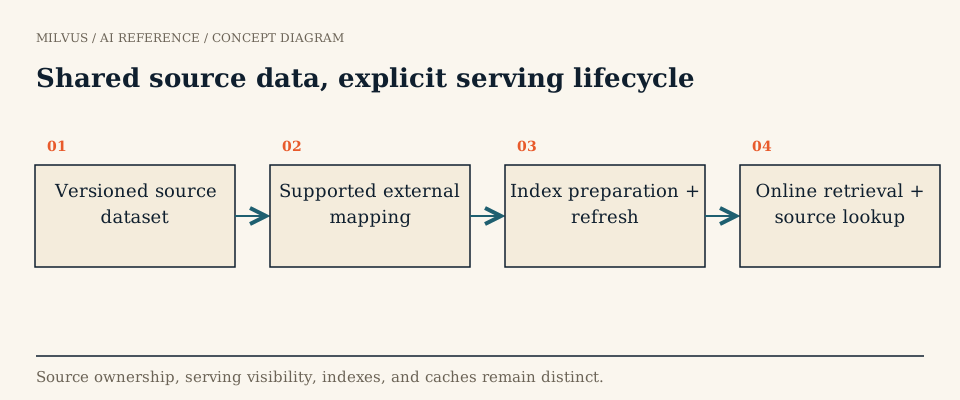 Shared source data, explicit serving lifecycle
What is Lance, briefly?
Lance is an open-source, Apache-2.0 columnar format built for AI and multimodal data. It works at two levels: a file format and a table format. Compared with Parquet, it is designed for fast random access to individual rows, which matters for training-data shuffles, sampling, and fetching search results. Other features AI teams care about:
- Versioning. Every write commits a new dataset version, and older versions remain readable for time travel.
- Fragments. A dataset is a set of fragments, each holding a range of rows across one or more data files. Appends add fragments; compaction merges them.
- Data evolution. New columns, such as a fresh embedding, can be added without rewriting existing data.
- Blob encoding. Images, audio, and video can sit in the same table as their embeddings and metadata.
Lance is the format behind LanceDB, but the format and the product are separate things. Milvus reads Lance datasets; it does not attach to a LanceDB service or reuse LanceDB’s indexes.
Why serve Lance data from Milvus?
Many multimodal teams already use Lance as their training and curation store because random access and versioning suit those jobs. When that same data needs production retrieval — thousands of concurrent queries, filtered search, hybrid dense-plus-sparse ranking, tenant isolation, replicas — they want a serving engine built for it. An external collection gives them that without exporting the dataset into a second store and keeping two copies aligned.
How the integration works
| Step | What happens |
|---|---|
| Create | You define a schema that points at the Lance dataset directory, with external_field mapping each Milvus field to a Lance column |
| Refresh | Milvus reads the dataset’s current metadata and maps its fragments into a Storage V3 manifest |
| Index | Milvus builds the vector and scalar indexes you declared |
| Serve | Search, query, and get run through the normal Milvus APIs |
| Update | The Lance writer appends or rewrites data; you refresh to adopt the new state |
Lance datasets are supported on Amazon S3, Google Cloud Storage, ADLS Gen2, Alibaba Cloud OSS, and Azure Blob Storage, according to the Storage V3 guide. External sources require Milvus 3.0.x with Storage V3 enabled (common.storage.useLoonFFI: true, off by default).
The general setup — external_source, external_spec with credentials in extfs, add_field(..., external_field=...), index creation, and refresh_external_collection — is the same as for Parquet and is shown in the external collection guide. Use the format value the guide lists for Lance sources in your release.
Example: an image-search corpus
Suppose a Lance dataset holds 200 million product images with columns image_id, uri, category, clip_v2 (a 768-dim vector), and the image bytes as a blob.
- Map
image_id,category, andclip_v2into the external collection. Leave the blob column out; the application can fetch the image byuriafter search. - Build an index on
clip_v2and a scalar index oncategoryif you filter by it. - Return only
image_idandurifrom search, so each query avoids pulling large columns from object storage.
When the team adds a clip_v3 column through Lance’s data-evolution API, Milvus can expose it with add_collection_field() followed by a refresh, provided the column already exists in the source. Changing a vector field’s dimension, renaming, or remapping fields is not supported in an external collection (alter external collection schema), which is why adding a new column per model version is the cleaner pattern.
Keep identity in your data, not in fragments
Lance fragment IDs and row positions change when a dataset is compacted or rewritten. Use an application-owned key such as image_id for bookmarks, labels, and training manifests, and keep the encoder revision as metadata. The stable identity guide explains how to design those keys.
What to test before production
- An update cycle. Append, replace, and delete a few rows through the Lance writer, refresh, and check that canary IDs behave correctly. See how to refresh an external collection safely.
- Compaction. Run Lance compaction, refresh, and confirm search results still resolve to the same
image_ids. - Version cleanup. Lance can remove old versions; make sure cleanup does not delete files your current Milvus view references.
- Latency with payloads. Compare p99 latency when returning only IDs against returning large columns.
If your application must write single records in real time, import a serving subset into a managed collection instead; external collections are read-only.
Related reading
- How do Lance, Iceberg, and Parquet play different roles in a vector lake?
- When should you use a Milvus external collection?
- How should you curate image and video data with vector retrieval?
- What are multimodal embeddings?
Sources
- Storage V3: Lance-table source
- Create an external collection
- Alter an external collection schema
- Lance format and ecosystem
- Try it end to end: start with the Milvus Quickstart.