

Use a Milvus external collection when the data you want to search already lives in a data lake, is written by a pipeline you do not want to duplicate, and changes in batches rather than row by row. An external collection lets Milvus 3.0 build vector and scalar indexes over Parquet, Vortex, Lance, or Iceberg data that stays where it is. If your application needs to insert, update, or delete individual rows itself, a regular managed collection is the better fit.
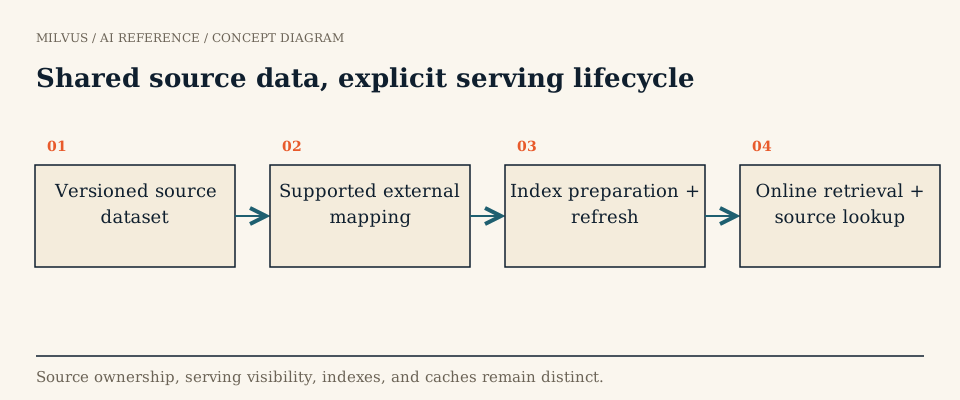 Shared source data, explicit serving lifecycle
What is an external collection?
The Milvus docs define an external collection as a collection that accesses data in external storage or tables, such as files on Amazon S3 or an Iceberg table, without copying it into Milvus. You declare a schema whose fields point at columns in the source, create indexes, and then refresh. During refresh Milvus scans the source metadata and writes manifest files that map Milvus’s view to rows in the external files. Search, query, and filtering then work through the normal Milvus APIs.
Two properties shape every decision about it:
- It is read-only. Storage V3 creates and refreshes its own manifest without modifying or copying the source data. Edits happen in the system that owns the lake table.
- It is only as fresh as the last refresh. A new file or snapshot in the lake becomes searchable after you refresh, not before.
External collection, managed collection, or bulk import?
| Question | External collection | Managed collection + bulk import | Managed collection + streaming inserts |
|---|---|---|---|
| Where do source rows live? | In your lake, once | Copied into Milvus storage | Written to Milvus directly |
| Who writes? | Lake pipelines (Spark, Flink, table services) | Batch loader, then the application | The application |
| Row-level insert/upsert/delete via Milvus | No | Yes | Yes |
| Freshness | Each refresh | Each import, then real time | Near real time |
| Best for | Large shared corpora, discovery, curation, training-data search | A serving subset loaded from files | Interactive apps, agent memory, frequently edited data |
A good rule: if more than one system reads the dataset and the lake already governs it, start external. If the dataset exists mainly to power one application, use a managed collection.
Which sources and storage backends are supported?
According to the Storage V3 guide:
| Source | What you point Milvus at | Notes |
|---|---|---|
| Parquet | A directory or object-storage prefix of Parquet files | Milvus reads file metadata and row groups |
| Vortex | A directory or prefix of Vortex files | Uses Vortex layout and statistics for projection and random reads |
| Lance | A Lance dataset directory | Fragments are mapped into the Milvus manifest |
| Iceberg | A metadata JSON file plus a snapshot ID | Position deletes are honored; equality deletes are not supported |
All four work on Amazon S3, Google Cloud Storage, ADLS Gen2, and Alibaba Cloud OSS; Azure Blob Storage supports everything except Iceberg. Credentials go in the collection’s external_spec: access keys, an IAM role, a cross-account role ARN, or Milvus’s own global storage credentials.
What does it look like in code?
The schema carries the source location and format; each field names its source column with external_field. This example follows the external collection guide:
from pymilvus import MilvusClient, DataType

client = MilvusClient(uri="http://localhost:19530", token="root:Milvus")

schema = MilvusClient.create_schema(
    external_source="s3://s3.us-west-2.amazonaws.com/my-bucket/products/",
    external_spec='{"format": "parquet", "extfs": {"use_iam": "true", "region": "us-west-2", "cloud_provider": "aws", "use_ssl": "true"}}',
)
schema.add_field(field_name="product_id", datatype=DataType.INT64, external_field="id")
schema.add_field(field_name="product_name", datatype=DataType.VARCHAR, max_length=512, external_field="name")
schema.add_field(field_name="embedding", datatype=DataType.FLOAT_VECTOR, dim=768, external_field="vector")

client.create_collection(collection_name="products_lake", schema=schema)

index_params = client.prepare_index_params()
index_params.add_index(field_name="embedding", index_type="AUTOINDEX", metric_type="COSINE")
client.create_index(collection_name="products_lake", index_params=index_params)

job_id = client.refresh_external_collection(collection_name="products_lake")
Refresh runs asynchronously; poll it with get_refresh_external_collection_progress(job_id=...). The full refresh lifecycle is covered in how to refresh an external collection safely.
Prerequisites and limits to check first
- Milvus 3.0.x with Storage V3 enabled. Storage V3 is off by default (
common.storage.useLoonFFI: trueturns it on), and downgrading after enabling it is not supported. - Schema changes are additive only. You can add a field that already exists in the source, then refresh. Dropping, renaming, retyping, changing vector dimensions, or remapping
external_fieldis not supported, and sparse-vector or StructArray fields cannot be added after creation (alter external collection schema). - Iceberg equality deletes must be rewritten to position deletes before refresh. See Milvus and Iceberg.
- Map a stable key. Choose a source column that identifies the record across file rewrites; see stable identities between lake data and vector search.
How should you evaluate the cost?
External collections remove the second copy of source rows, but they do not make serving free. Indexes still have to be built and stored, the manifest has to be maintained, and queries that return payload fields may read from object storage. Measure four things on a realistic slice: index build time after refresh, p95/p99 search latency with and without payload fields, object-store request counts, and the delay from a lake commit to a searchable result. Compare them with a managed collection holding only the fields you serve. Often the answer is a mix: the full corpus external for discovery and curation, a compact managed collection for the hot product path.
A good first experiment
Point an external collection at a small Parquet or Iceberg dataset with known IDs. Refresh, then run a few ID lookups and filtered searches. Append rows and delete rows through the lake’s own writer, publish, refresh again, and confirm that results match the new source state exactly. If that loop is clear and fast enough for your freshness budget, the pattern will scale.
Related reading
- What is a vector data lake?
- How can Milvus search data stored in Lance?
- How do you handle incremental updates in a vector database?
- How do you compare managed and self-hosted vector-search costs?
Sources
- Create an external collection
- Storage V3 configuration and source formats
- Alter an external collection schema
- Ready to try it? Install Milvus with the Quickstart.