

MinHash FunctionCompatible with Milvus 3.0.x
The MinHash function converts raw text into binary vectors that approximate Jaccard similarity between documents. It applies text shingling and multiple hash functions to produce fixed-length signature vectors, enabling fast near-duplicate detection and document deduplication at scale.
As a built-in function, MinHash runs within Milvus and does not require external model inference or preprocessing. You insert raw text, and Milvus generates the MinHash signature vectors automatically.
Limits
The output field must be a
BINARY_VECTORwith a dimension that satisfiesdim % 32 == 0, because each MinHash signature is a 32-bit hash value.The
dimof the binary vector field must equal32 * num_hashes. A mismatch causes an error.When using
MINHASH_LSHindex with MinHash function output,mh_element_bit_widthmust be set to32.
How MinHash works
MinHash is a locality-sensitive hashing technique that estimates Jaccard similarity between sets. In Milvus, the MinHash function follows this pipeline: you provide raw text as input, and Milvus produces a binary vector as output — handling all intermediate steps internally.
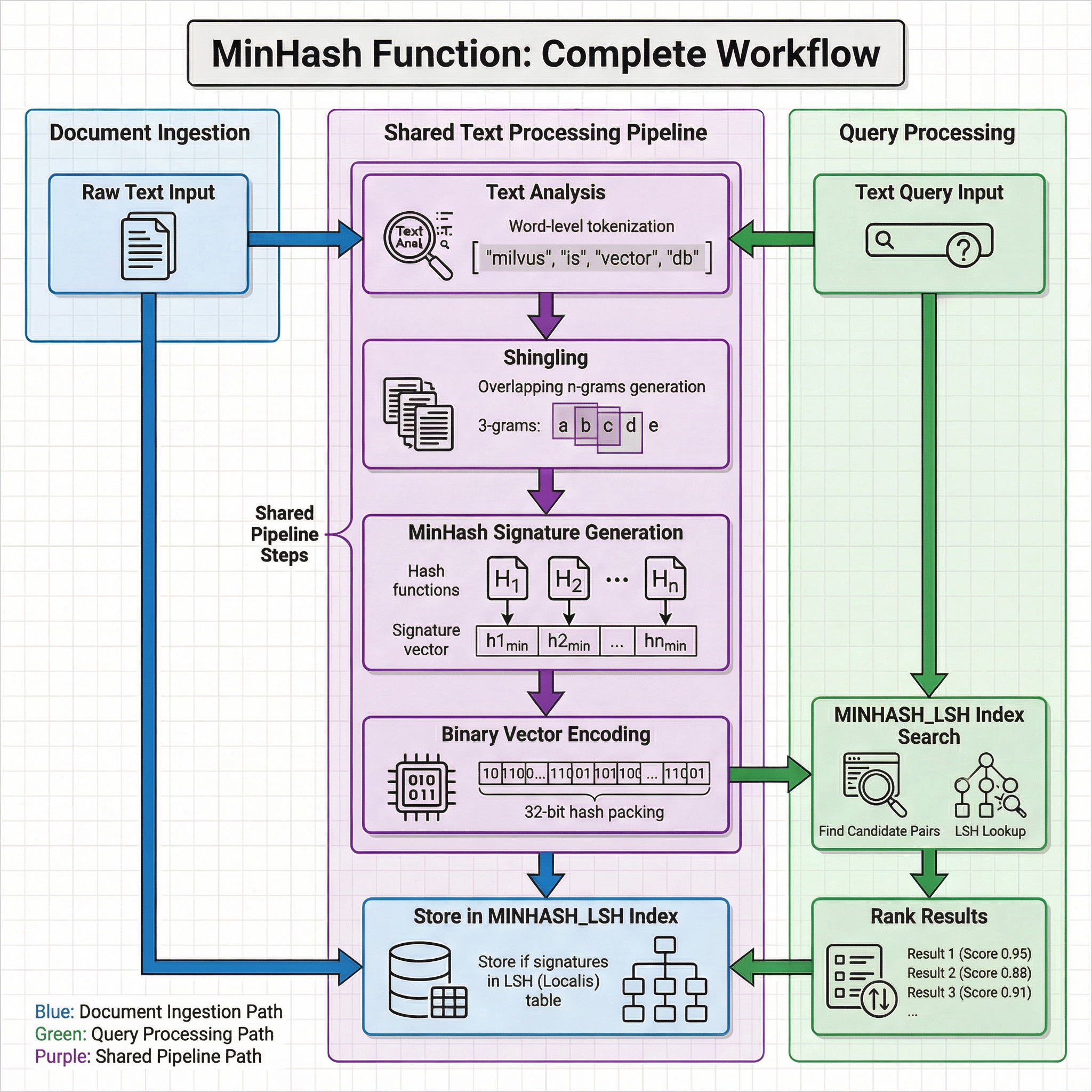
The overall workflow consists of a shared text processing pipeline used by both document ingestion and query processing, followed by phase-specific operations for storage and retrieval.
 Iaqkbfeh8oqggsx6nsocfosondo
Shared text processing pipeline
Both document ingestion and query processing pass raw text through the same four-stage transformation:
Text analysis: The text is processed by an analyzer (when
token_levelis"word") or used directly (whentoken_levelis"char"). Word-level tokenization applies the analyzer configured on the input field to segment text into terms — for example,"milvus is vector db"becomes["milvus", "is", "vector", "db"].Shingling: The tokens are split into overlapping n-grams (shingles) of size
shingle_size. For example, with 3-grams at word level, the tokens["information", "retrieval", "is", "a", "field"]become shingles like["information retrieval is", "retrieval is a", "is a field"].MinHash signature generation: Multiple hash functions (H1, H2, …, Hn, where n =
num_hashes) are applied to the shingle set. For each hash function, the minimum hash value across all shingles is selected. The collection of these minimum values forms the MinHash signature — a fixed-length representation that approximates the Jaccard similarity of the original document.Binary vector encoding: Each signature value is a 32-bit hash, and the full signature is packed into a
BINARY_VECTORof dimension32 * num_hashes.
Document ingestion
During insertion, the binary vector produced by the shared pipeline is stored in the MINHASH_LSH index. The index maintains an LSH (Locality-Sensitive Hashing) table that groups similar signatures into the same buckets, enabling fast candidate retrieval at query time.
Query processing
During search, the query text goes through the same shared pipeline to produce a binary vector. This vector is used to perform an LSH lookup in the MINHASH_LSH index, which quickly identifies candidate pairs that are likely similar. Candidates are then ranked by estimated Jaccard similarity and the top-K results are returned.
Because both paths share the same transformation logic, two documents with highly overlapping content produce similar MinHash signatures. This makes the function effective for finding near-duplicates even when documents differ in word order, formatting, or minor phrasing.
Before you start
Before using the MinHash function, plan your collection schema to include the following:
A text field for raw content
Your collection must include a
VARCHARfield to store raw text. This field serves as the input to the MinHash function.An analyzer for the text field (when using word-level tokenization)
If
token_levelis set to"word"(default), the text field must have an analyzer enabled. The analyzer defines how text is tokenized before shingling. By default, Milvus uses thestandardanalyzer. To configure a different analyzer, refer to Choose the Right Analyzer for Your Use Case.A binary vector field for MinHash output
Your collection must include a
BINARY_VECTORfield to store the binary vectors generated by the MinHash function. The dimension must equal32 * num_hashes.
Step 1: Create a collection with a MinHash function
To use the MinHash function, define it when creating the collection. The function becomes part of the collection schema and is applied automatically during data insertion and search.
Define schema fields
Your collection schema must include at least three fields:
Primary field: Uniquely identifies each entity in the collection.
Text field (
VARCHAR): Stores raw text documents. Setenable_analyzer=Trueso Milvus can process the text for MinHash signature generation. By default, Milvus uses thestandardanalyzer for text analysis. To configure a different analyzer, refer to Choose the Right Analyzer for Your Use Case.Binary vector field (
BINARY_VECTOR): Stores binary vectors automatically generated by the MinHash function. The dimension must equal32 * num_hashes.
from pymilvus import MilvusClient, DataType, Function, FunctionType

client = MilvusClient(uri="http://localhost:19530", token="root:Milvus")

schema = client.create_schema()

schema.add_field(field_name="id", datatype=DataType.INT64, is_primary=True, auto_id=True)
schema.add_field(field_name="document_content", datatype=DataType.VARCHAR, max_length=9000, enable_analyzer=True)
schema.add_field(field_name="binary_vector", datatype=DataType.BINARY_VECTOR, dim=8192)
// java
// nodejs
// go
# restful
Define the MinHash function
The MinHash function converts analyzed text into binary vectors that approximate Jaccard similarity between documents.
Define the function and add it to your schema:
minhash_function = Function(
    name="minhash_function",
    input_field_names=["document_content"], # Name of the VARCHAR field containing raw text
    output_field_names=["binary_vector"], # Name of the BINARY_VECTOR field for generated signatures
    function_type=FunctionType.MINHASH,
    params={
        "num_hashes": 256, # Number of hash functions; produces dim = 32 * 256 = 8192
        "shingle_size": 3, # N-gram size for shingling
    }
)

schema.add_function(minhash_function)
// java
// nodejs
// go
# restful
Configuration options
The params dictionary of the MinHash function accepts the following parameters. All parameter names are case-insensitive.
Parameter |
Type |
Default |
Description |
|---|---|---|---|
|
int |
Derived from |
Number of hash functions for signature generation. The output binary vector dimension equals |
|
int |
|
N-gram size for shingling. Word-level: 1-3 is typical. Character-level: 2-6 is typical. |
|
str |
|
Hash function to use. Options:
|
|
str |
|
Tokenization level. Options:
|
|
int |
|
Random seed for MinHash function initialization. |
Configure the index
The recommended index type for MinHash binary vectors is MINHASH_LSH, with metric type MHJACCARD.
index_params = client.prepare_index_params()

index_params.add_index(
    field_name="binary_vector",
    index_type="MINHASH_LSH",
    metric_type="MHJACCARD",
    params={
        "mh_lsh_band": 128,
        "mh_element_bit_width": 32,
        "with_raw_data": True,
    },
)
// java
// nodejs
// go
# restful
Create the collection
Create the collection using the schema and index parameters defined above:
client.create_collection(
    collection_name="dedup_collection",
    schema=schema,
    index_params=index_params,
)
// java
// nodejs
// go
# restful
Step 2: Insert documents
After setting up your collection, insert text data. You only need to provide the raw text — the MinHash function automatically generates the binary vector for each document.
client.insert(
    "dedup_collection",
    [
        {"document_content": "information retrieval is a field of study that helps users find relevant information in large datasets"},
        {"document_content": "information retrieval is a research field focused on helping users find relevant data in large collections"},
        {"document_content": "information retrieval is a field of research helping users search for relevant information in large datasets"},
    ],
)
// java
// nodejs
// go
# restful
Step 3: Search with MinHash
Once you have inserted data, search for near-duplicate documents by providing raw text queries. Milvus automatically converts your query text into a MinHash binary vector and retrieves the most similar documents using estimated Jaccard similarity.
search_params = {
    "metric_type": "MHJACCARD",
    "params": {},
}

results = client.search(
    collection_name="dedup_collection",
    data=["information retrieval is a research field focused on helping users find relevant data in large collections"],
    anns_field="binary_vector",
    limit=3,
    output_fields=["document_content"],
    search_params=search_params,
)

for hits in results:
    for hit in hits:
        print(f"ID: {hit['id']}, Distance: {hit['distance']}")
        print(f"Document: {hit['entity']['document_content']}")
// java
// nodejs
// go
# restful
What’s next
Full Text Search: Use BM25 for lexical relevance ranking instead of near-duplicate detection.
Analyzer Overview: Configure custom analyzers for text tokenization.
MINHASH_LSH Index: Learn about tuning LSH parameters for recall and performance.