

Attu is the graphical administration tool for Milvus. It connects to a Milvus cluster (or Zilliz Cloud) as a client and gives you a browser or desktop interface for browsing databases and collections, inspecting schemas and indexes, loading and releasing collections, previewing and importing data, running filtered vector searches, and managing users, roles, and other cluster settings. It is built by Zilliz and runs as its own process, separate from the Milvus server.
Think of Attu as the “see what is actually in there” tool. Code tells you what your application meant to write; Attu shows you what the database holds, how each collection is configured, and what a search really returns. That makes it most valuable during development, debugging, and day-to-day operations, alongside the SDKs and APIs that run your production workload.
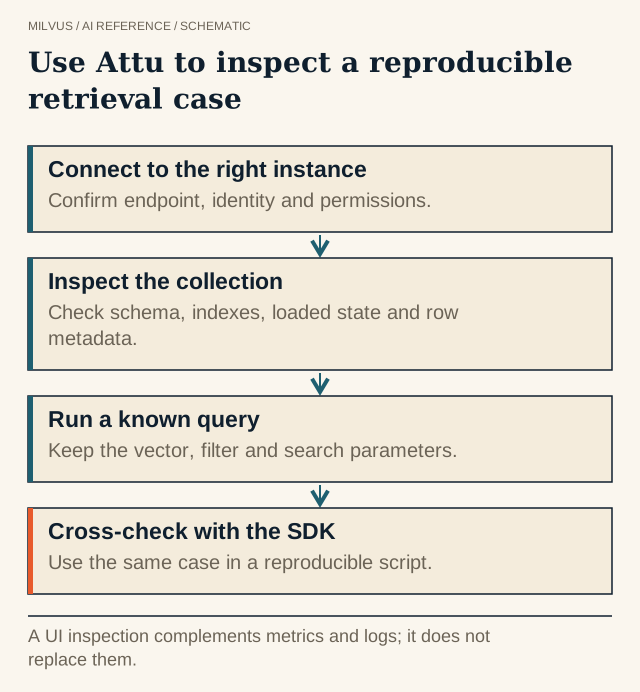 Use Attu to inspect a reproducible retrieval case. A UI inspection complements metrics and logs; it does not replace them.
What can you do with Attu?
The current Attu release (v3.0) groups its features into a few areas:
| Area | What you can do |
|---|---|
| Collections and schema | Create, inspect, and drop databases and collections; view fields, vector dimensions, primary keys, dynamic fields, and index definitions; load or release collections |
| Data | Browse and filter entities, insert sample data, and import or export CSV, JSON, and Parquet |
| Search | Run vector similarity searches with filter expressions, choose output fields, and explore result neighborhoods in a graph view |
| Access control | Manage Milvus users, roles, and privileges (RBAC), plus resource groups |
| Operations | Watch cluster health with Prometheus metrics, run full or incremental backups to S3, MinIO, GCS, or Azure, and review audit logs |
| Productivity | Connect to several clusters from one Attu instance, try requests in a REST API playground, and use a built-in AI agent for chat-driven management |
Attu v3.0 also understands Milvus 3.0 features such as external collections and TEXT fields. Feature availability tracks the Attu release, so check the release notes when a menu item you expect is missing.
How do you install Attu and connect it to Milvus?
There are four common ways to run Attu. Pick the one that matches where your Milvus lives.
Docker is the most common choice for a server or a shared team instance:
docker run -d --name attu \
  -p 3000:3000 \
  -e MILVUS_ADDRESS=host.docker.internal:19530 \
  -v attu-data:/data \
  zilliz/attu:v3.0.0
Open http://localhost:3000. host.docker.internal lets the container reach a Milvus server running on the same host machine; replace it with the Milvus service address in any other setup. The /data volume keeps Attu’s saved connections and settings across container restarts.
Desktop app. Download the macOS, Linux, or Windows build from the Attu GitHub releases page. This is the quickest option for a laptop pointed at a local or development cluster. On Apple Silicon Macs, macOS may quarantine the app; the Milvus Attu guide shows the xattr command that clears it.
Kubernetes. The Attu repository ships a deployment manifest you can apply next to a Milvus cluster running in the same Kubernetes environment.
Standalone server. A Linux x64 server tarball is available for hosts where you prefer not to use containers.
Once Attu is open, enter the Milvus address (for example http://localhost:19530 for Milvus Standalone) and credentials if authentication is enabled. For Zilliz Cloud, use the cluster’s public endpoint and an API key. Attu also supports one-way TLS and mutual TLS to Milvus through environment variables for the CA certificate, client key, and certificate chain.
Which Attu version works with my Milvus version?
Match Attu to the Milvus major/minor release you run:
| Milvus version | Attu version |
|---|---|
| 3.x | v3.0.0 |
| 2.6.x | v3.0.0 |
| 2.5.x | v2.5.10 |
| Zilliz Cloud | v3.0.0 |
Attu v3.0 supports Milvus 2.6.0 and later. If you still run Milvus 2.5, stay on the matching 2.5 Attu release rather than pointing a newer Attu at an older server. One licensing detail matters for some teams: Attu was Apache-2.0 open source through v2.5.12, and from v2.6.0 onward it is distributed as proprietary software. Check the license terms in the repository if that affects how you deploy it.
Attu vs. Milvus WebUI: which should you use?
Since Milvus 2.5, every Milvus deployment also includes a built-in WebUI, served by the proxy at http://<proxy-ip>:9091/webui. The two tools overlap a little but answer different questions:
| Attu | Milvus WebUI | |
|---|---|---|
| Installation | Separate tool you deploy | Built into Milvus |
| Primary focus | Managing data and the database: collections, search, RBAC, backups | Runtime observability: segments, channels, tasks, slow queries, configuration |
| Typical user | Application developers and DBAs | Cluster maintainers and developers debugging internals |
| Multiple clusters | Yes, from one instance | One per Milvus deployment |
Use Attu when you want to look at or change data and schema. Use the WebUI when you want to see what the cluster is doing internally, for example why a segment has not been indexed yet. Neither replaces a proper metrics stack for alerting.
Using Attu to debug a search result
Attu shines when a search returns something unexpected. A reliable routine:
- Confirm the target. Check the connection, database, and collection names. Similar names across development and production are a classic source of confusion, so label saved connections clearly.
- Check the schema and index. Verify the vector field, its dimension, the metric type (COSINE, IP, or L2), and the index type and parameters. A collection built for COSINE but queried with vectors from a different embedding model will look “random” no matter how good the index is.
- Check the load state. A collection must be loaded before it can be searched.
- Reproduce the query. Use the same vector, filter expression, top-k, and output fields as the application. Make sure a tenant or document-version filter really excludes what it should.
- Inspect returned IDs and payloads, not just the text snippets. A stale document, an incompatible embedding, and too little ANN search effort look similar in a UI but need different fixes.
When you have narrowed the cause, write the same request as an SDK test so the check runs automatically. A screenshot of a good result cannot protect a dataset that keeps changing; a scripted query with expected IDs can.
Is Attu safe to expose?
Attu acts with whatever Milvus credentials it is given, so treat it like any database console. Server deployments of Attu v3 enable local login by default, with a bootstrap admin set through environment variables; a single-user mode turns that off and should stay on trusted machines. Beyond that:
- Connect with a Milvus user whose privileges match the task. Read-only roles are enough for exploration, and Milvus RBAC is what actually limits what Attu can do.
- Keep a shared Attu instance behind your internal network or an authenticating proxy rather than on the public internet.
- Remember that RBAC controls collection- and operation-level access. It does not enforce row-level rules from your application, so filters that separate tenants still belong in application code.
- Include Attu itself in your operations plan: its version, its persisted
/datavolume, and who has access.
Frequently asked questions
Is Attu part of Milvus? No. It is a separate client application that talks to Milvus over its public APIs. Milvus runs fine without it.
Does Attu work with Zilliz Cloud? Yes. Connect with the cluster endpoint and an API key.
Can I use Attu in production? Many teams run a gated Attu instance for operators. Use it for inspection and controlled changes, and keep schema creation, data loading, and index changes in versioned code so they are reproducible.
Related reading
- How should you build a reproducible application workflow with PyMilvus?
- How do authentication, RBAC, and tenant filters protect Milvus applications?
- How does the Milvus architecture separate ingestion, storage, and search?
- How do metadata filters interact with vector search?
- When should you use a Milvus external collection?
- How do you get from a Milvus deployment to the first verified query?
Next step
Follow the Quick Start with Attu to load a sample collection and run your first search in the GUI, or start with the Milvus Quickstart if you do not have a Milvus instance yet. If you would rather not run Milvus yourself, Zilliz Cloud works with the same Attu release.