
Keeping AI Agents Grounded: Context Engineering Strategies that Prevent Context Rot Using Milvus
If you’ve worked with long-running LLM conversations, you’ve probably had this frustrating moment: halfway through a long thread, the model starts drifting. Answers get vague, reasoning weakens, and key details mysteriously vanish. But if you drop the exact same prompt into a new chat, suddenly the model behaves—focused, accurate, grounded.
This isn’t the model “getting tired” — it’s context rot. As a conversation grows, the model has to juggle more information, and its ability to prioritize slowly declines. Antropic studies show that as context windows stretch from around 8K tokens to 128K, retrieval accuracy can drop by 15–30%. The model still has room, but it loses track of what matters. Bigger context windows help delay the problem, but they don’t eliminate it.
This is where context engineering comes in. Instead of handing the model everything at once, we shape what it sees: retrieving only the pieces that matter, compressing what no longer needs to be verbose, and keeping prompts and tools clean enough for the model to reason over. The goal is simple: make important information available at the right moment, and ignore the rest.
Retrieval plays a central role here, especially for long-running agents. Vector databases like Milvus provide the foundation for efficiently pulling relevant knowledge back into context, letting the system stay grounded even as tasks grow in depth and complexity.
In this blog, we’ll look at how context rot happens, the strategies teams use to manage it, and the architectural patterns — from retrieval to prompt design — that keep AI agents sharp across long, multi-step workflows.
Why Context Rot Happens
People often assume that giving an AI model more context naturally leads to better answers. But that’s not actually true. Humans struggle with long inputs too: cognitive science suggests our working memory holds roughly 7±2 chunks of information. Push beyond that, and we start to forget, blur, or misinterpret details.
LLMs show similar behavior—just at a much larger scale and with more dramatic failure modes.
The root issue comes from the Transformer architecture itself. Every token must compare itself against every other token, forming pairwise attention across the entire sequence. That means computation grows O(n²) with context length. Expanding your prompt from 1K tokens to 100K doesn’t make the model “work harder”—it multiplies the number of token interactions by 10,000×.
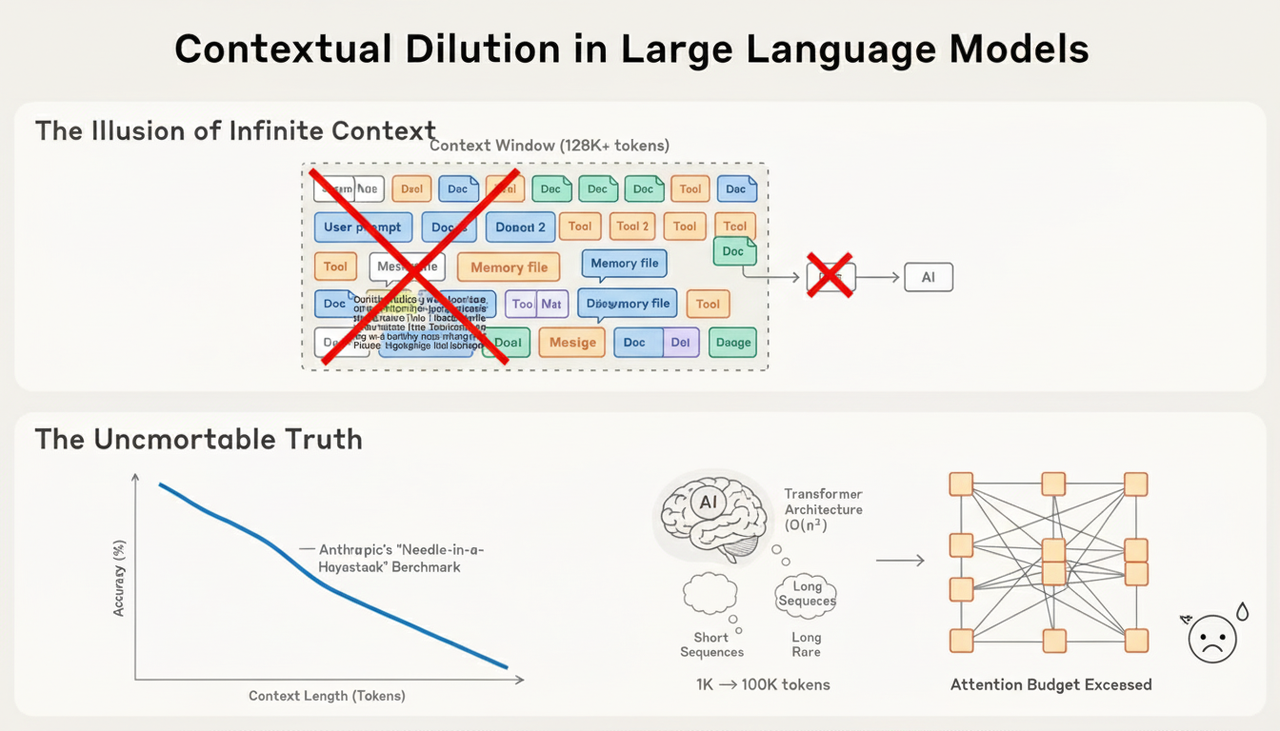
Then there’s the problem with the training data. Models see far more short sequences than long ones. So when you ask an LLM to operate across extremely large contexts, you’re pushing it into a regime it wasn’t heavily trained for. In practice, very long-context reasoning is often out of distribution for most models.
Despite these limits, long context is now unavoidable. Early LLM applications were mostly single-turn tasks—classification, summarization, or simple generation. Today, more than 70% of enterprise AI systems rely on agents that stay active across many rounds of interaction, often for hours, managing branching, multi-step workflows. Long-lived sessions have moved from exception to default.
Then the next question is: how do we keep the model’s attention sharp without overwhelming it?
Context Retrieval Approaches to Solving Context Rot
Retrieval is one of the most effective levers we have to combat context rot, and in practice it tends to show up in complementary patterns that address context rot from different angles.
1. Just-in-Time Retrieval: Reducing Unnecessary Context
One major cause of context rot is overloading the model with information it doesn’t need yet. Claude Code—Anthropic’s coding assistant—solves this issue with Just-in-Time (JIT) retrieval, a strategy where the model fetches information only when it becomes relevant.
Instead of stuffing entire codebases or datasets into its context (which greatly increases the chance of drift and forgetting), Claude Code maintains a tiny index: file paths, commands, and documentation links. When the model needs a piece of information, it retrieves that specific item and inserts it into context at the moment it matters—not before.
For example, if you ask Claude Code to analyze a 10GB database, it never tries to load the whole thing. It works more like an engineer:
Runs a SQL query to pull high-level summaries of the dataset.
Uses commands like
headandtailto view sample data and understand its structure.Retains only the most important information—such as key statistics or sample rows—within the context.
By minimizing what’s kept in context, JIT retrieval prevents the buildup of irrelevant tokens that cause rot. The model stays focused because it only ever sees the information required for the current reasoning step.
2. Pre-retrieval (Vector Search): Preventing Context Drift Before It Starts
Sometimes the model can’t “ask” for information dynamically—customer support, Q&A systems, and agent workflows often need the right knowledge available before generation begins. This is where pre-retrieval becomes critical.
Context rot often happens because the model is handed a large pile of raw text and expected to sort out what matters. Pre-retrieval flips that: a vector database (like Milvus and Zilliz Cloud) identifies the most relevant pieces before inference, ensuring only high-value context reaches the model.
In a typical RAG setup:
Documents are embedded and stored in a vector database, such as Milvus.
At query time, the system retrieves a small set of highly relevant chunks through similarity searches.
Only those chunks go into the model’s context.
This prevents rot in two ways:
Noise reduction: irrelevant or weakly related text never enters the context in the first place.
Efficiency: models process far fewer tokens, reducing the chance of losing track of essential details.
Milvus can search millions of documents in milliseconds, making this approach ideal for live systems where latency matters.
3. Hybrid JIT and Vector Retrieval
Vector search-based pre-retrieval addresses a significant part of context rot by ensuring the model starts with high-signal information rather than raw, oversized text. But Anthropic highlights two real challenges that teams often overlook:
Timeliness: If the knowledge base updates faster than the vector index is rebuilt, the model may rely on stale information.
Accuracy: Before a task begins, it’s hard to predict precisely what the model will need—especially for multi-step or exploratory workflows.
So in real world workloads, a hybrid appaorch is the optimal solution.
Vector search for stable, high-confidence knowledge
Agent-driven JIT exploration for information that evolves or only becomes relevant mid-task
By blending these two approaches, you get the speed and efficiency of vector retrieval for known information, and the flexibility for the model to discover and load new data whenever it becomes relevant.
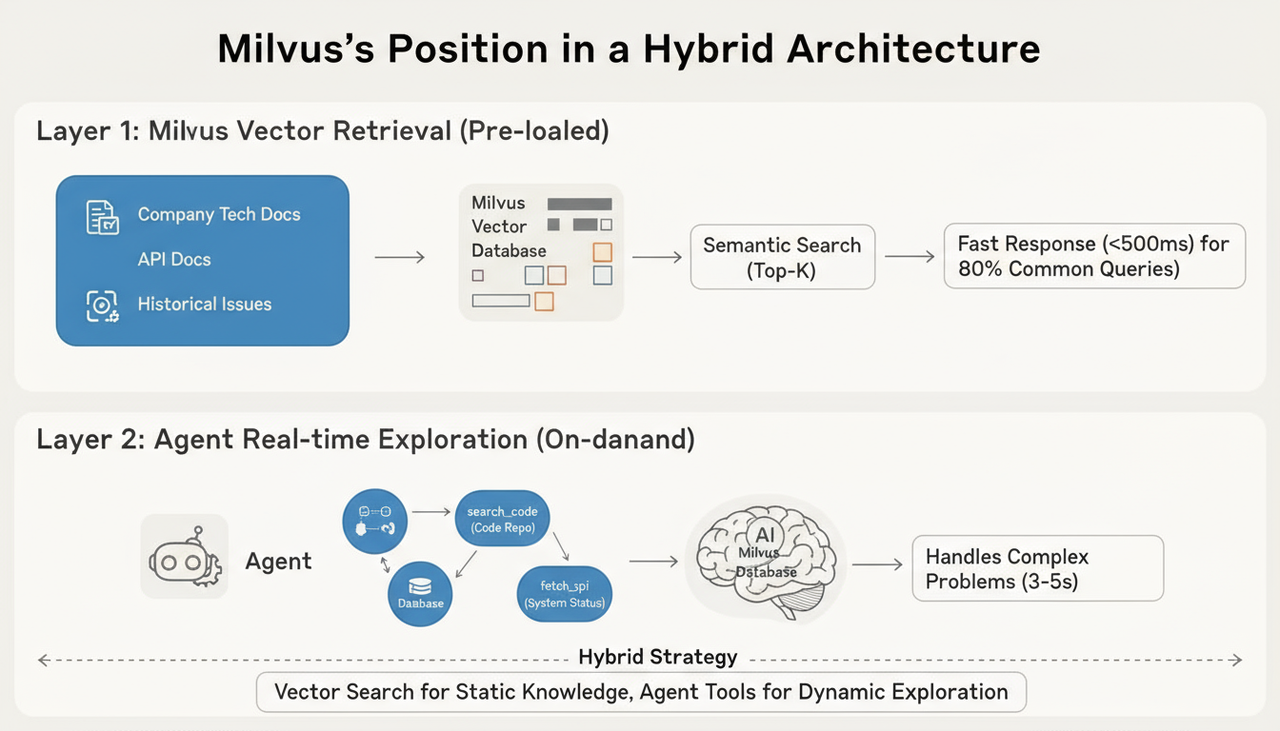
Let’s look at how this works in a real system. Take a production documentation assistant, for example. Most teams eventually settle on a two-stage pipeline: Milvus-powered vector search + agent-based JIT retrieval.
1. Milvus Powered Vector Search (Pre-retrieval)
Convert your documentation, API references, changelogs, and known issues into embeddings.
Store them in the Milvus Vector Database with metadata like product area, version, and update time.
When a user asks a question, run a semantic search to grab the top-K relevant segments.
This resolves roughly 80% of routine queries in under 500 ms, giving the model a strong, context-rot-resistant starting point.
2. Agent-Based Exploration
When the initial retrieval isn’t sufficient—e.g., when the user asks for something highly specific or time-sensitive—the agent can call tools to fetch new information:
Use
search_codeto locate specific functions or files in the codebaseUse
run_queryto pull real-time data from the databaseUse
fetch_apito obtain the latest system status
These calls typically take 3–5 seconds, but they ensure the model always works with fresh, accurate, and relevant data—even for questions the system couldn’t anticipate beforehand.
This hybrid structure ensures context remains timely, correct, and task-specific, dramatically reducing the risk of context rot in long-running agent workflows.
Milvus is especially effective in these hybrid scenarios because it supports:
Vector search + scalar filtering, combining semantic relevance with structured constraints
Incremental updates, allowing embeddings to be refreshed without downtime
This makes Milvus an ideal backbone for systems that need both semantic understanding and precise control over what gets retrieved.
For example, you might run a query like:
# You can combine queries like this in Milvus
collection.search(
    data=[query_embedding],  # Semantic similarity
    anns_field="embedding",
    param={"metric_type": "COSINE", "params": {"nprobe": 10}},
    expr="doc_type == 'API' and update_time > '2025-01-01'",  # Structured filtering
    limit=5
)
How to Choose the Right Approach for Dealing With Context Rot
With vector-search pre-retrieval, Just-in-Time retrieval, and hybrid retrieval all available, the natural question is: which one should you use?
Here is a simple but practical way to choose—based on how stable your knowledge is and how predictable the model’s information needs are.
1. Vector Search → Best for Stable Domains
If the domain changes slowly but demands precision—finance, legal work, compliance, medical documentation—then a Milvus-powered knowledge base with pre-retrieval is usually the right fit.
The information is well-defined, updates are infrequent, and most questions can be answered by retrieving semantically relevant documents upfront.
Predictable tasks + stable knowledge → Pre-retrieval.
2. Just-in-Time Retrieval → Best for Dynamic, Exploratory Workflows
Fields like software engineering, debugging, analytics, and data science involve rapidly changing environments: new files, new data, new deployment states. The model can’t predict what it will need before the task starts.
Unpredictable tasks + fast-changing knowledge → Just-in-Time retrieval.
3. Hybrid Approach → When Both Conditions Are True
Many real systems aren’t purely stable or purely dynamic. For example, developer documentation changes slowly, whereas the state of a production environment changes minute by minute. A hybrid approach lets you:
Load known, stable knowledge using vector search (fast, low-latency)
Fetch dynamic information with agent tools on demand (accurate, up-to-date)
Mixed knowledge + mixed task structure → Hybrid retrieval approach.
What if the Context Window Still Isn’t Enough
Context engineering helps reduce overload, but sometimes the problem is more fundamental: the task simply won’t fit, even with careful trimming.
Certain workflows—like migrating a large codebase, reviewing multi-repository architectures, or generating deep research reports—can exceed 200K+ context windows before the model reaches the end of the task. Even with vector search doing heavy lifting, some tasks require more persistent, structured memory.
Recently, Anthropic has offered three practical strategies.
1. Compression: Preserve Signal, Drop Noise
When the context window approaches its limit, the model can compress earlier interactions into concise summaries. Good compression keeps
Key decisions
Constraints and requirements
Outstanding issues
Relevant samples or examples
And removes:
Verbose tool outputs
Irrelevant logs
Redundant steps
The challenge is balance. Compress too aggressively, and the model loses critical information; compress too lightly, and you gain little space. Effective compression keeps the “why” and “what” while discarding the “how we got here.”
2. Structured Note-Taking: Move Stable Information Outside Context
Instead of keeping everything inside the model’s window, the system can store important facts in external memory—a separate database or a structured store that the agent can query as needed.
For example, Claude’s Pokémon-agent prototype stores durable facts like:
Pikachu leveled up to 8Trained 1234 steps on Route 1Goal: reach level 10
Meanwhile, transient details—battle logs, long tool outputs—stay outside the active context. This mirrors how humans use notebooks: we don’t keep every detail in our working memory; we store reference points externally and look them up when needed.
Structured note-taking prevents context rot caused by repeated, unnecessary details while giving the model a reliable source of truth.
3. Sub-Agent Architecture: Divide and Conquer Large Tasks
For complex tasks, a multi-agent architecture can be designed where a lead agent oversees the overall work, while several specialized sub-agents handle specific aspects of the task. These sub-agents dive deep into large amounts of data related to their sub-tasks but only return the concise, essential results. This approach is commonly used in scenarios like research reports or data analysis.

In practice, it’s best to start by using a single agent combined with compression to handle the task. External storage should only be introduced when there’s a need to retain memory across sessions. The multi-agent architecture should be reserved for tasks that genuinely require parallel processing of complex, specialized sub-tasks.
Each approach extends the system’s effective “working memory” without blowing the context window—and without triggering context rot.
Best Practices for Designing Context That Actually Works
After handling context overflow, there’s another equally important piece: how the context is built in the first place. Even with compression, external notes, and sub-agents, the system will struggle if the prompt and tools themselves aren’t designed to support long, complex reasoning.
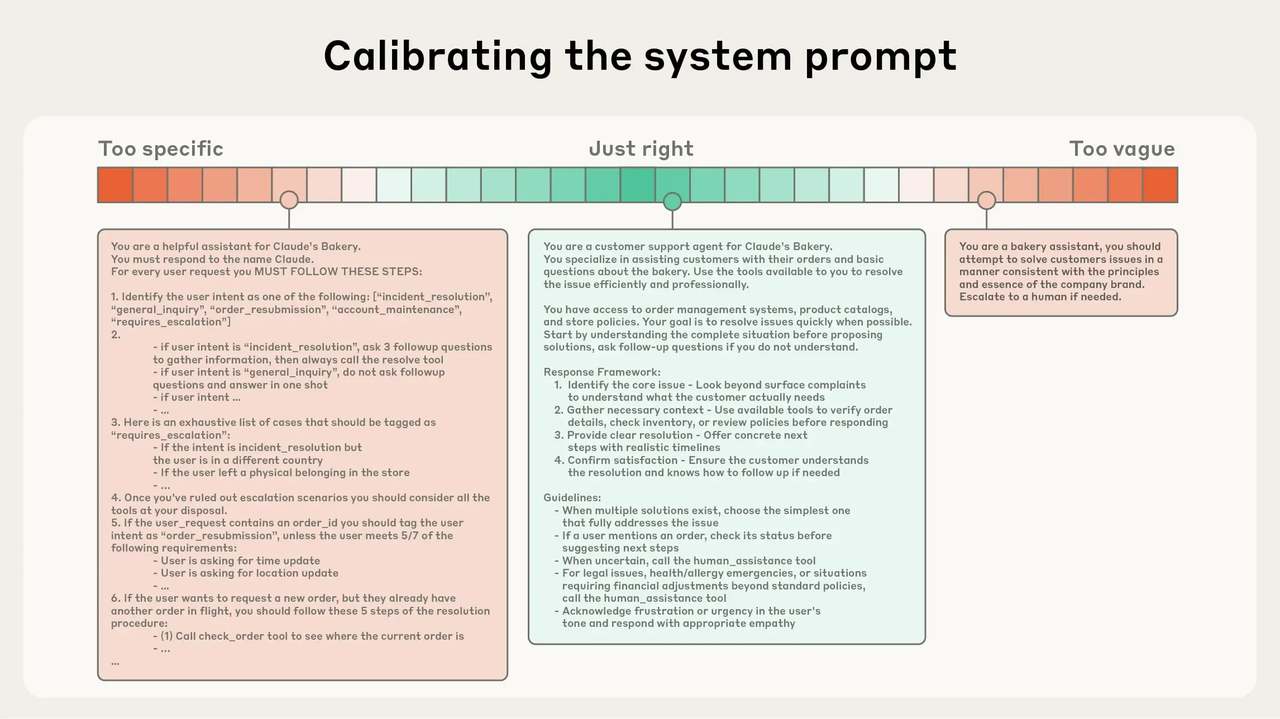
Anthropic offers a helpful way to think about this—less as a single prompt-writing exercise, and more as constructing context across three layers.
System Prompts: Find the Goldilocks Zone
Most system prompts fail at the extremes. Too much detail—lists of rules, nested conditions, hard-coded exceptions—makes the prompt brittle and difficult to maintain. Too little structure leaves the model guessing what to do.
The best prompts sit in the middle: structured enough to guide behavior, flexible enough for the model to reason. In practice, this means giving the model a clear role, a general workflow, and light tool guidance—nothing more, nothing less.
For example:
You are a technical documentation assistant serving developers.
1. Start by retrieving relevant documents from the Milvus knowledge base.
2. If the retrieval results are insufficient, use the `search_code` tool to perform a deeper search in the codebase.
3. When answering, cite specific documentation sections or code line numbers.

## Tool guidance
- search_docs: Used for semantic retrieval, best for conceptual questions.
- search_code: Used for precise lookup in the codebase, best for implementation-detail questions.
…
This prompt sets direction without overwhelming the model or forcing it to juggle dynamic information that doesn’t belong here.
Tool Design: Less Is More
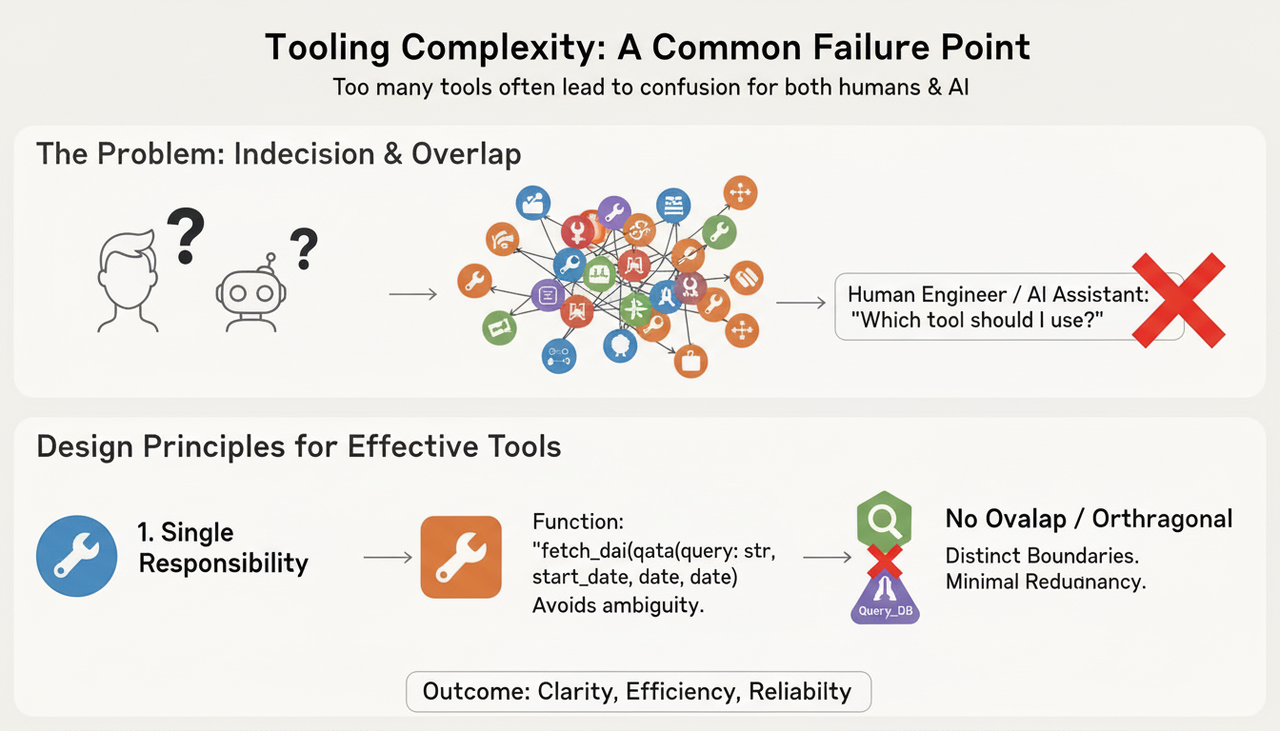
Once the system prompt sets the high-level behavior, tools carry the actual operational logic. A surprisingly common failure mode in tool-augmented systems is simply having too many tools—or having tools whose purposes overlap.
A good rule of thumb:
One tool, one purpose
Explicit, unambiguous parameters
No overlapping responsibilities
If a human engineer would hesitate about which tool to use, the model will too. Clean tool design reduces ambiguity, lowers cognitive load, and prevents context from being cluttered with unnecessary tool attempts.
Dynamic Information Should Be Retrieved, Not Hardcoded
The final layer is the easiest to overlook. Dynamic or time-sensitive information—such as status values, recent updates, or user-specific state—should not appear in the system prompt at all. Baking it into the prompt guarantees it will become stale, bloated, or contradictory over long tasks.
Instead, this information should be fetched only when needed, either through retrieval or via agent tools. Keeping dynamic content out of the system prompt prevents context rot and keeps the model’s reasoning space clean.
Conclusion
As AI agents move into production environments across different industries, they’re taking on longer workflows and more complex tasks than ever before. In these settings, managing context becomes a practical necessity.
However, a bigger context window doesn’t automatically produce better results; in many cases, it does the opposite. When a model is overloaded, fed stale information, or forced through massive prompts, accuracy quietly drifts. That slow, subtle decline is what we now call context rot.
Techniques like JIT retrieval, pre-retrieval, hybrid pipelines, and vector-database-powered semantic search all aim at the same goal: making sure the model sees the right information at the right moment — no more, no less — so it can stay grounded and produce reliable answers.
As an open-source, high-performance vector database, Milvus sits at the core of this workflow. It provides the infrastructure for storing knowledge efficiently and retrieving the most relevant pieces with low latency. Paired with JIT retrieval and other complementary strategies, Milvus helps AI agents remain accurate as their tasks become deeper and more dynamic.
But retrieval is only one piece of the puzzle. Good prompt design, a clean and minimal toolset, and sensible overflow strategies — whether compression, structured notes, or sub-agents — all work together to keep the model focused across long-running sessions. This is what real context engineering looks like: not clever hacks, but thoughtful architecture.
If you want AI agents that stay accurate over hours, days, or entire workflows, context deserves the same attention you’d give to any other core part of your stack.
Have questions or want a deep dive on any feature? Join our Discord channel or file issues on GitHub. You can also book a 20-minute one-on-one session to get insights, guidance, and answers to your questions through Milvus Office Hours.
- Why Context Rot Happens
- Context Retrieval Approaches to Solving Context Rot
- 1. Just-in-Time Retrieval: Reducing Unnecessary Context
- 2. Pre-retrieval (Vector Search): Preventing Context Drift Before It Starts
- 3. Hybrid JIT and Vector Retrieval
- How to Choose the Right Approach for Dealing With Context Rot
- 1. Vector Search → Best for Stable Domains
- 2. Just-in-Time Retrieval → Best for Dynamic, Exploratory Workflows
- 3. Hybrid Approach → When Both Conditions Are True
- What if the Context Window Still Isn’t Enough
- 1. Compression: Preserve Signal, Drop Noise
- 2. Structured Note-Taking: Move Stable Information Outside Context
- 3. Sub-Agent Architecture: Divide and Conquer Large Tasks
- Best Practices for Designing Context That Actually Works
- System Prompts: Find the Goldilocks Zone
- Tool Design: Less Is More
- Dynamic Information Should Be Retrieved, Not Hardcoded
- Conclusion
On This Page
Try Managed Milvus for Free
Zilliz Cloud is hassle-free, powered by Milvus and 10x faster.
Get StartedLike the article? Spread the word