

Stop Paying for Cold Data: 80% Cost Reduction with On-Demand Hot–Cold Data Loading in Milvus Tiered Storage
How many of you are still paying premium infrastructure bills for data your system barely touches? Be honest — most teams are.
If you run vector search in production, you’ve probably seen this firsthand. You provision large amounts of memory and SSDs so everything stays “query-ready,” even though only a small slice of your dataset is actually active. And you’re not alone. We’ve seen a lot of similar cases as well:
Multi-tenant SaaS platforms: Hundreds of onboarded tenants, but only 10–15% active on any given day. The rest sit cold but still occupy resources.
E-commerce recommendation systems: A million SKUs, yet the top 8% of products generate most of the recommendations and search traffic.
AI search: Vast archives of embeddings, even though 90% of user queries hit items from the past week.
It’s the same story across industries: less than 10% of your data gets queried frequently, but it often consumes 80% of your storage and memory. Everyone knows the imbalance exists — but until recently, there hasn’t been a clean architectural way to fix it.
That changes with Milvus 2.6.
Before this release, Milvus (like most vector databases) depended on a full-load model: if data needed to be searchable, it had to be loaded onto local nodes. It didn’t matter whether that data was hit a thousand times a minute or once a quarter — it all had to stay hot. That design choice ensured predictable performance, but it also meant oversizing clusters and paying for resources that cold data simply didn’t deserve.
Tiered Storage is our answer.
Milvus 2.6 introduces a new tiered storage architecture with true on-demand loading, letting the system differentiate between hot and cold data automatically:
Hot segments stay cached close to the compute
Cold segments live cheaply in remote object storage
Data is pulled into local nodes only when a query actually needs it
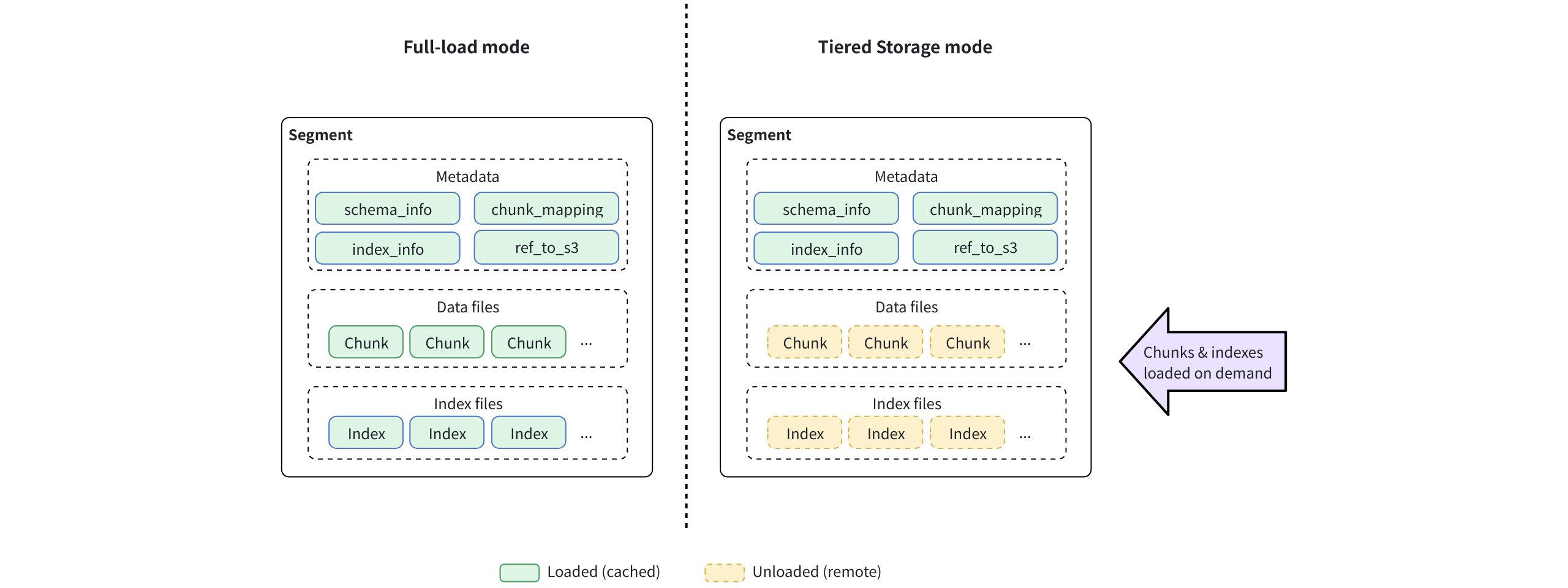
This shifts your cost structure from “how much data you have” to “how much data you actually use.” And in early production deployments, this simple shift delivers up to an 80% reduction in storage and memory cost.
In the rest of this post, we’ll walk through how Tiered Storage works, share real performance results, and show where this change delivers the biggest impact.
Why Full Loading Breaks Down at Scale
Before diving into the solution, it’s worth taking a closer look at why the full-load mode used in Milvus 2.5 and earlier releases became a limiting factor as workloads scaled.
In Milvus 2.5 and earlier, when a user issued a Collection.load() request, each QueryNode cached the entire collection locally, including metadata, field data, and indexes. These components are downloaded from object storage and stored either fully in memory or memory-mapped (mmap) to local disk. Only after all of this data is available locally is the collection marked as loaded and ready to serve queries.
In other words, the collection is not queryable until the full dataset—hot or cold—is present on the node.
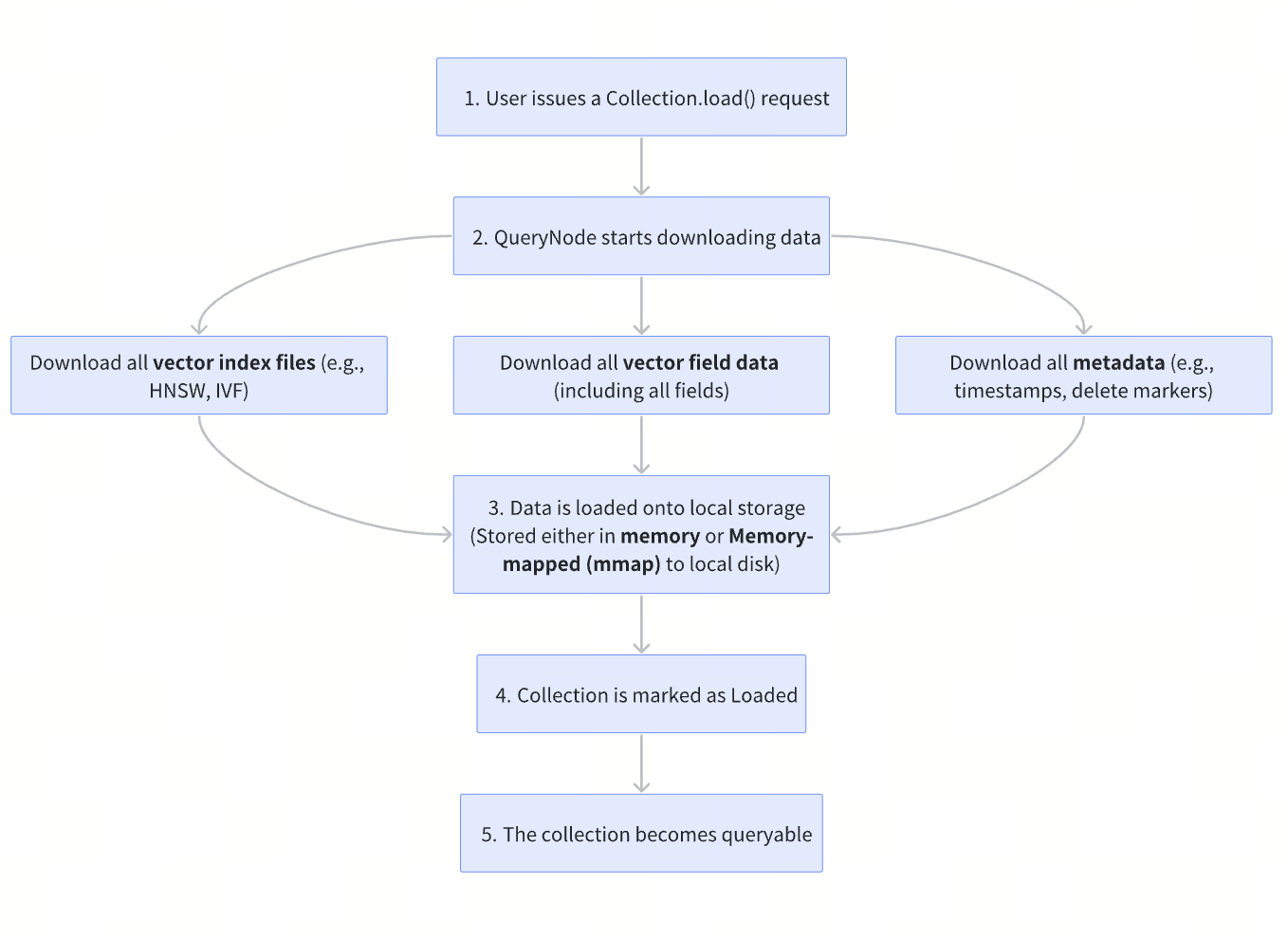
Note: For index types that embed raw vector data, Milvus loads only the index files, not the vector field separately. Even so, the index must be fully loaded to serve queries, regardless of how much of the data is actually accessed.
To see why this becomes problematic, consider a concrete example:
Suppose you have a mid-sized vector dataset with:
100 million vectors
768 dimensions (BERT embeddings)
float32 precision (4 bytes per dimension)
An HNSW index
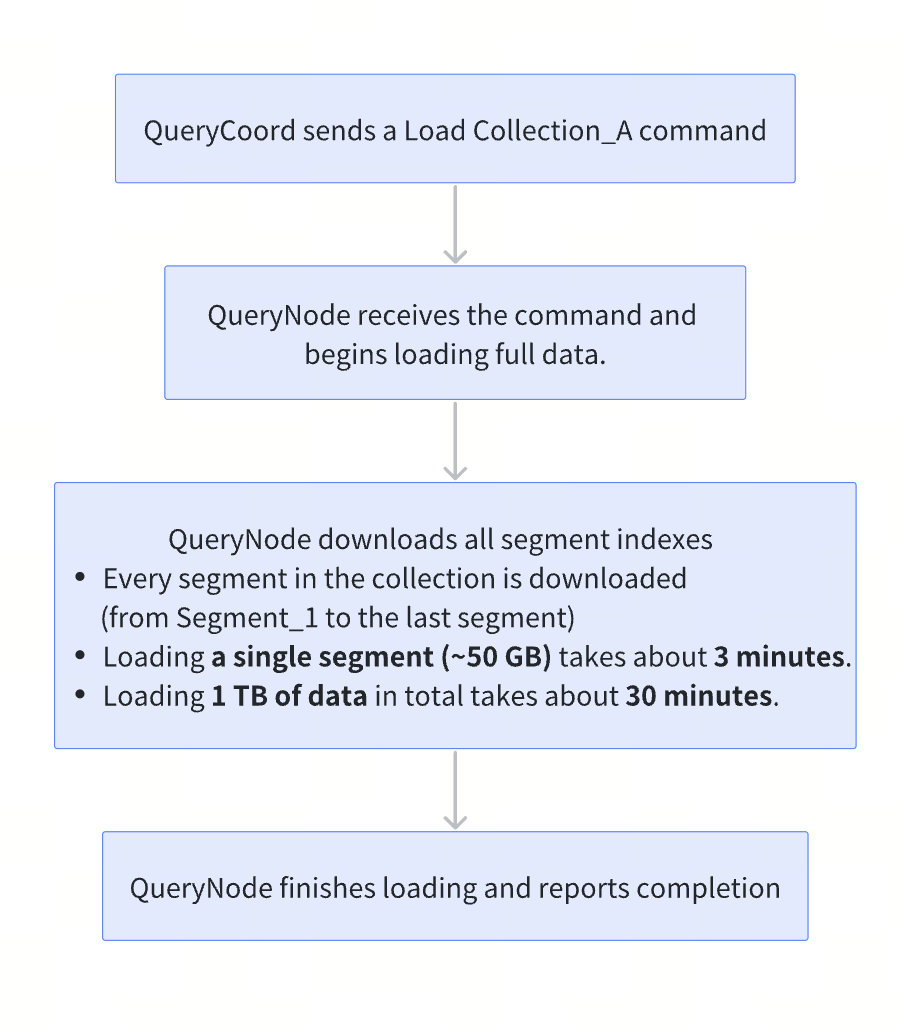
In this setup, the HNSW index alone—including the embedded raw vectors—consumes approximately 430 GB of memory. After adding common scalar fields such as user IDs, timestamps, or category labels, total local resource usage easily exceeds 500 GB.
This means that even if 80% of the data is rarely or never queried, the system must still provision and hold more than 500 GB of local memory or disk just to keep the collection online.
For some workloads, this behavior is acceptable:
If nearly all data is frequently accessed, fully loading everything delivers the lowest possible query latency—at the highest cost.
If data can be divided into hot and warm subsets, memory-mapping warm data to disk can partially reduce memory pressure.
However, in workloads where 80% or more of the data sits in the long tail, the drawbacks of full loading surface quickly, across both performance and cost.
Performance bottlenecks
In practice, full loading affects more than query performance and often slows down routine operational workflows:
Longer rolling upgrades: In large clusters, rolling upgrades can take hours or even a full day, as each node must reload the entire dataset before becoming available again.
Slower recovery after failures: When a QueryNode restarts, it cannot serve traffic until all data is reloaded, significantly prolonging recovery time and amplifying the impact of node failures.
Slower iteration and experimentation: Full loading slows down development workflows, forcing AI teams to wait hours for data to load when testing new datasets or index configurations.
Cost inefficiencies
Full loading also drives up infrastructure costs. For example, on mainstream cloud memory-optimized instances, storing 1 TB of data locally costs roughly **5.74 / GB / month; GCP n4-highmem: ~5.67 / GB / month).
Now consider a more realistic access pattern, where 80% of that data is cold and could be stored in object storage instead (at roughly $0.023 / GB / month):
200 GB hot data × $5.68
800 GB cold data × $0.023
Annual cost: (200×5.68+800×0.023)×12≈$14,000
That’s an 80% reduction in total storage cost, without sacrificing performance where it actually matters.
What Is the Tiered Storage and How Does It Work?
To remove the trade-off, Milvus 2.6 introduced Tiered Storage, which balances performance and cost by treating local storage as a cache rather than a container for the entire dataset.
In this model, QueryNodes load only lightweight metadata at startup. Field data and indexes are fetched on demand from remote object storage when a query requires them, and cached locally if they are accessed frequently. Inactive data can be evicted to free up space.
As a result, hot data stays close to the compute layer for low-latency queries, while cold data remains in object storage until needed. This reduces load time, improves resource efficiency, and allows QueryNodes to query datasets far larger than their local memory or disk capacity.
In practice, Tiered Storage works as follows:
Keep hot data local: Roughly 20% of frequently accessed data remains resident on local nodes, ensuring low latency for the 80% of queries that matter most.
Load cold data on demand: The remaining 80% of rarely accessed data is fetched only when needed, freeing up the majority of local memory and disk resources.
Adapt dynamically with LRU-based eviction: Milvus uses an LRU (Least Recently Used) eviction strategy to continuously adjust which data is considered hot or cold. Inactive data is automatically evicted to make room for newly accessed data.
With this design, Milvus is no longer constrained by the fixed capacity of local memory and disk. Instead, local resources function as a dynamically managed cache, where space is continuously reclaimed from inactive data and reallocated to active workloads.
Under the hood, this behavior is enabled by three core technical mechanisms:
1. Lazy Load
At initialization, Milvus loads only minimal segment-level metadata, allowing collections to become queryable almost immediately after startup. Field data and index files remain in remote storage and are fetched on demand during query execution, keeping local memory and disk usage low.
How collection loading worked in Milvus 2.5
How lazy loading works in Milvus 2.6 and later
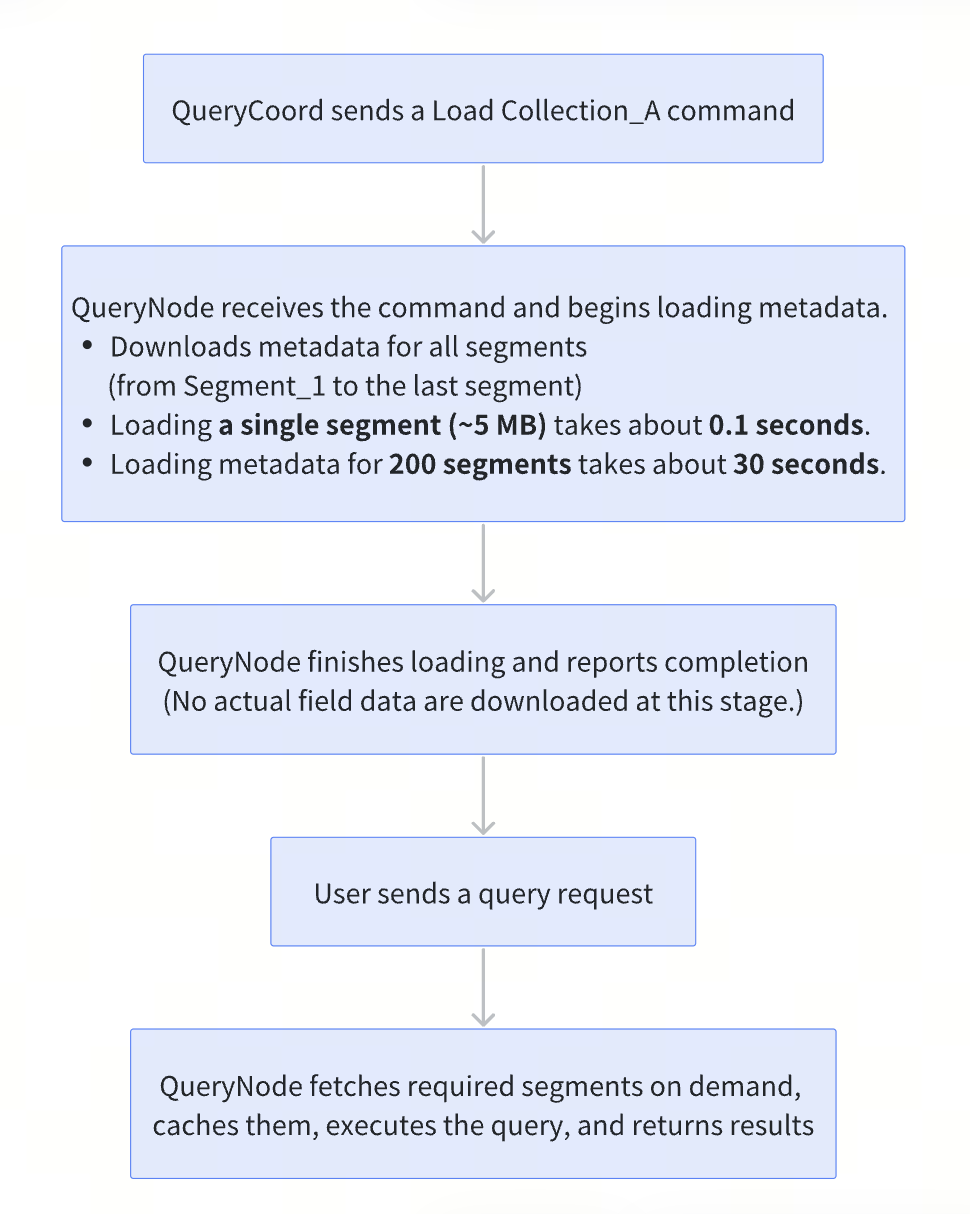
The metadata loaded during initialization falls into four key categories:
Segment statistics (Basic information such as row count, segment size, and schema metadata)
Timestamps (Used to support time-travel queries)
Insert and delete records (Required to maintain data consistency during query execution)
Bloom filters (Used for fast pre-filtering to quickly eliminate irrelevant segments)
2. Partial Load
While Lazy loading controls when data is loaded, partial loading controls how much data is loaded. Once queries or searches begin, the QueryNode performs a partial load, fetching only the required data chunks or index files from object storage.
Vector indexes: Tenant-aware loading
One of the most impactful capabilities introduced in Milvus 2.6+ is tenant-aware loading of vector indexes, designed specifically for multi-tenant workloads.
When a query accesses data from a single tenant, Milvus loads only the portion of the vector index belonging to that tenant, skipping index data for all other tenants. This keeps local resources focused on active tenants.
This design provides several benefits:
Vector indexes for inactive tenants do not consume local memory or disk
Index data for active tenants stays cached for low-latency access
A tenant-level LRU eviction policy ensures fair cache usage across tenants
Scalar fields: Column-level partial loading
Partial loading also applies to scalar fields, allowing Milvus to load only the columns explicitly referenced by a query.
Consider a collection with 50 schema fields, such as id, vector, title, description, category, price, stock, and tags, and you only need to return three fields—id, title, and price.
In Milvus 2.5, all 50 scalar fields are loaded regardless of query requirements.
In Milvus 2.6+, only the three requested fields are loaded. The remaining 47 fields stay unloaded and are fetched lazily only if they are accessed later.
The resource savings can be substantial. If each scalar field occupies 20 GB:
Loading all fields requires 1,000 GB (50 × 20 GB)
Loading only the three required fields uses 60 GB
This represents a 94% reduction in scalar data loading, without affecting query correctness or results.
Note: Tenant-aware partial loading for scalar fields and vector indexes will be officially introduced in an upcoming release. Once available, it will further reduce load latency and improve cold-query performance in large multi-tenant deployments.
3. LRU-Based Cache Eviction
Lazy loading and partial loading significantly reduce how much data is brought into local memory and disk. However, in long-running systems, the cache will still grow as new data is accessed over time. When local capacity is reached, LRU-based cache eviction takes effect.
LRU (Least Recently Used) eviction follows a simple rule: data that has not been accessed recently is evicted first. This frees up local space for newly accessed data while keeping frequently used data resident in the cache.
Performance Evaluation: Tiered Storage vs. Full Loading
To evaluate the real-world impact of Tiered Storage, we set up a test environment that closely mirrors production workloads. We compared Milvus with and without Tiered Storage across five dimensions: load time, resource usage, query performance, effective capacity, and cost efficiency.
Experimental setup
Dataset
100 million vectors with 768 dimensions (BERT embeddings)
Vector index size: approximately 430 GB
10 scalar fields, including ID, timestamp, and category
Hardware configuration
1 QueryNode with 4 vCPUs, 32 GB memory, and 1 TB NVMe SSD
10 Gbps network
MinIO object storage cluster as the remote storage backend
Access pattern
Queries follow a realistic hot–cold access distribution:
80% of queries target data from the most recent 30 days (≈20% of total data)
15% target data from 30–90 days (≈30% of total data)
5% target data older than 90 days (≈50% of total data)
Key results
1. 33× faster load time
| Stage | Milvus 2.5 | Milvus 2.6+ (Tiered Storage) | Speedup |
|---|---|---|---|
| Data download | 22 minutes | 28 seconds | 47× |
| Index loading | 3 minutes | 17 seconds | 10.5× |
| Total | 25 minutes | 45 seconds | 33× |
In Milvus 2.5, loading the collection took 25 minutes. With Tiered Storage in Milvus 2.6+, the same workload completes in just 45 seconds, representing a step-change improvement in load efficiency.
2. 80% Reduction in Local Resource Usage
| Stage | Milvus 2.5 | Milvus 2.6+ (Tiered Storage) | Reduction |
|---|---|---|---|
| After load | 430 GB | 12 GB | –97% |
| After 1 hour | 430 GB | 68 GB | –84% |
| After 24 hours | 430 GB | 85 GB | –80% |
| Steady state | 430 GB | 85–95 GB | ~80% |
In Milvus 2.5, local resource usage remains constant at 430 GB, regardless of workload or runtime. In contrast, Milvus 2.6+ starts with just 12 GB immediately after loading.
As queries run, frequently accessed data is cached locally and resource usage gradually increases. After approximately 24 hours, the system stabilizes at 85–95 GB, reflecting the working set of hot data. Over the long term, this results in an ~80% reduction in local memory and disk usage, without sacrificing query availability.
3. Near-zero impact on hot data performance
| Query type | Milvus 2.5 P99 latency | Milvus 2.6+ P99 latency | Change |
|---|---|---|---|
| Hot data queries | 15 ms | 16 ms | +6.7% |
| Warm data queries | 15 ms | 28 ms | +86% |
| Cold data queries (first access) | 15 ms | 120 ms | +700% |
| Cold data queries (cached) | 15 ms | 18 ms | +20% |
For hot data, which accounts for roughly 80% of all queries, P99 latency increases by only 6.7%, resulting in virtually no perceptible impact in production.
Cold data queries show higher latency on first access due to on-demand loading from object storage. However, once cached, their latency increases by only 20%. Given the low access frequency of cold data, this trade-off is generally acceptable for most real-world workloads.
4. 4.3× Larger Effective Capacity
Under the same hardware budget—eight servers with 64 GB of memory each (512 GB total)—Milvus 2.5 can load at most 512 GB of data, equivalent to approximately 136 million vectors.
With Tiered Storage enabled in Milvus 2.6+, the same hardware can support 2.2 TB of data, or roughly 590 million vectors. This represents a 4.3× increase in effective capacity, enabling significantly larger datasets to be served without expanding local memory.
5. 80.1% Cost Reduction
Using a 2 TB vector dataset in an AWS environment as an example, and assuming 20% of the data is hot (400 GB), the cost comparison is as follows:
| Item | Milvus 2.5 | Milvus 2.6+ (Tiered Storage) | Savings |
|---|---|---|---|
| Monthly cost | $11,802 | $2,343 | $9,459 |
| Annual cost | $141,624 | $28,116 | $113,508 |
| Savings rate | – | – | 80.1% |
Benchmark Summary
Across all tests, Tiered Storage delivers consistent and measurable improvements:
33× faster load times: Collection load time is reduced from 25 minutes to 45 seconds.
80% lower local resource usage: In steady-state operation, memory and local disk usage drop by approximately 80%.
Near-zero impact on hot data performance: P99 latency for hot data increases by less than 10%, preserving low-latency query performance.
Controlled latency for cold data: Cold data incurs higher latency on first access, but this is acceptable given its low access frequency.
4.3× higher effective capacity: The same hardware can serve 4–5× more data without additional memory.
Over 80% cost reduction: Annual infrastructure costs are reduced by more than 80%.
When to Use Tiered Storage in Milvus
Based on benchmark results and real-world production cases, we group Tiered Storage use cases into three categories to help you decide whether it is a good fit for your workload.
Best-Fit Use Cases
1. Multi-tenant vector search platforms
Characteristics: Large number of tenants with highly uneven activity; vector search is the core workload.
Access pattern: Fewer than 20% of tenants generate over 80% of vector queries.
Expected benefits: 70–80% cost reduction; 3–5× capacity expansion.
2. E-commerce recommendation systems (vector search workloads)
Characteristics: Strong popularity skew between top products and the long tail.
Access pattern: Top 10% of products account for ~80% of vector search traffic.
Expected benefits: No need for extra capacity during peak events; 60–70% cost reduction
3. Large-scale datasets with clear hot–cold separation (vector-dominant)
Characteristics: TB-scale or larger datasets, with access heavily biased toward recent data.
Access pattern: A classic 80/20 distribution: 20% of data serves 80% of queries
Expected benefits: 75–85% cost reduction
Good-Fit Use Cases
1. Cost-sensitive workloads
Characteristics: Tight budgets with some tolerance for minor performance trade-offs.
Access pattern: Vector queries are relatively concentrated.
Expected benefits: 50–70% cost reduction; Cold data may incur ~500 ms latency on first access, which should be evaluated against SLA requirements.
2. Historical data retention and archival search
Characteristics: Large volumes of historical vectors with very low query frequency.
Access pattern: Around 90% of queries target recent data.
Expected benefits: Retain full historical datasets; Keep infrastructure costs predictable and controlled
Poor-Fit Use Cases
1. Uniformly hot data workloads
Characteristics: All data is accessed at a similar frequency, with no clear hot–cold distinction.
Why unfit: Limited cache benefit; Added system complexity without meaningful gains
2. Ultra–low-latency workloads
Characteristics: Extremely latency-sensitive systems, such as financial trading or real-time bidding
Why unfit: Even small latency variations are unacceptable; Full loading provides more predictable performance
Quick Start: Try Tiered Storage in Milvus 2.6+
# Download Milvus 2.6.1+
$ wget https://github.com/milvus-io/milvus/releases/latest
# Configure Tiered Storage
$ vi milvus.yaml
queryNode.segcore.tieredStorage:
  warmup:
    scalarField: disable
    scalarIndex: disable
    vectorField: disable
    vectorIndex: disable
  evictionEnabled: true
# Launch Milvus
$ docker-compose up -d
Conclusion
Tiered Storage in Milvus 2.6 addresses a common mismatch between how vector data is stored and how it is actually accessed. In most production systems, only a small fraction of data is queried frequently, yet traditional loading models treat all data as equally hot. By shifting to on-demand loading and managing local memory and disk as a cache, Milvus aligns resource consumption with real query behavior rather than worst-case assumptions.
This approach allows systems to scale to larger datasets without proportional increases in local resources, while keeping hot-query performance largely unchanged. Cold data remains accessible when needed, with predictable and bounded latency, making the trade-off explicit and controllable. As vector search moves deeper into cost-sensitive, multi-tenant, and long-running production environments, Tiered Storage provides a practical foundation for operating efficiently at scale.
For more information about the Tiered Storage, check the documentation below:
Have questions or want a deep dive on any feature of the latest Milvus? Join our Discord channel or file issues on GitHub. You can also book a 20-minute one-on-one session to get insights, guidance, and answers to your questions through Milvus Office Hours.
Learn More about Milvus 2.6 Features
Introducing Milvus 2.6: Affordable Vector Search at Billion Scale
Introducing the Embedding Function: How Milvus 2.6 Streamlines Vectorization and Semantic Search
JSON Shredding in Milvus: 88.9x Faster JSON Filtering with Flexibility
Unlocking True Entity-Level Retrieval: New Array-of-Structs and MAX_SIM Capabilities in Milvus
Introducing AISAQ in Milvus: Billion-Scale Vector Search Just Got 3,200× Cheaper on Memory
Optimizing NVIDIA CAGRA in Milvus: A Hybrid GPU–CPU Approach to Faster Indexing and Cheaper Queries
MinHash LSH in Milvus: The Secret Weapon for Fighting Duplicates in LLM Training Data
Bring Vector Compression to the Extreme: How Milvus Serves 3× More Queries with RaBitQ
- Why Full Loading Breaks Down at Scale
- Performance bottlenecks
- Cost inefficiencies
- What Is the Tiered Storage and How Does It Work?
- 1. Lazy Load
- 2. Partial Load
- 3. LRU-Based Cache Eviction
- Performance Evaluation: Tiered Storage vs. Full Loading
- Experimental setup
- Key results
- Benchmark Summary
- When to Use Tiered Storage in Milvus
- Best-Fit Use Cases
- Good-Fit Use Cases
- Poor-Fit Use Cases
- Quick Start: Try Tiered Storage in Milvus 2.6+
- Conclusion
- Learn More about Milvus 2.6 Features
On This Page
Try Managed Milvus for Free
Zilliz Cloud is hassle-free, powered by Milvus and 10x faster.
Get StartedLike the article? Spread the word