

Text FieldCompatible with Milvus 3.0.x
In AI search applications, vector search helps you find semantically similar entities, but the application often also needs the original source text behind each match. An LLM or agent can use that text as context to read, cite, summarize, or include the result in a prompt.
Milvus provides the TEXT scalar field type for storing long source text directly with entities. Typical values include passages, long documents, article bodies, tickets, and logs. Unlike VARCHAR, which requires a fixed max_length, TEXT does not require you to set a maximum byte length in the collection schema.
To define a TEXT field, set datatype to DataType.TEXT.
schema.add_field(
    field_name="content",
    datatype=DataType.TEXT,
)
After the field is defined, each entity can include a string value in that field. You insert TEXT values like other scalar fields and return them from query or search results by listing the field in output_fields.
TEXT fields support null values. To enable this feature, set nullable to True. For details, refer to Nullable Field.
Limits
- A
TEXTfield cannot be a primary field. Primary fields supportINT64andVARCHAR. - In Milvus 3.0.0,
TEXTfields do not supportPHRASE_MATCH. - In Milvus 3.0.0,
TEXTfields do not support default values. - In Milvus 3.0.0,
TEXTfields are not supported in external collections. - In Milvus 3.0.0,
TEXTfields do not support scalar indexes. TEXTis not intended for regular metadata filtering. If you need to filter on short string metadata and the field value fits within theVARCHARlength limit, useVARCHAR.
Choose TEXT or VARCHAR
TEXT and VARCHAR both store string values, but they support different application needs. Use VARCHAR for short, bounded metadata that identifies, categorizes, or filters entities. Use TEXT for longer source content that gives an LLM or agent enough context to read, cite, summarize, or build a prompt.
| Aspect | VARCHAR | TEXT |
|---|---|---|
| Best for | Short metadata used to identify, categorize, or filter entities, such as title, tag, category, or external_id. | Longer source content used by LLM or agent workflows, such as content, passage, article_body, or log_message. |
| Length setting | Requires max_length, which defines the maximum number of bytes the field can store. The maximum value is 65,535 bytes. If a value may exceed this limit, use TEXT. | Does not require max_length, so the schema does not need a fixed byte limit for the text value. |
| Storage behavior | Stores each value within the field’s configured max_length. | Uses automatic storage selection for larger text values. For details, see How Milvus stores large TEXT values. |
| Primary field support | Can be used as a primary field. | Cannot be used as a primary field. |
| Filtering | Use for short string metadata that needs to appear in filter expressions, such as category == "news" or tag in ["ai", "database"]. | Not intended for regular metadata filtering. |
For details about VARCHAR fields, refer to VarChar Field.
How Milvus stores large TEXT values
When you insert an entity, the string you provide for a TEXT field is the TEXT value. Milvus compares the size of that value with dataNode.text.inlineThreshold, which is 65,536 bytes by default, and then chooses one of two internal storage paths.
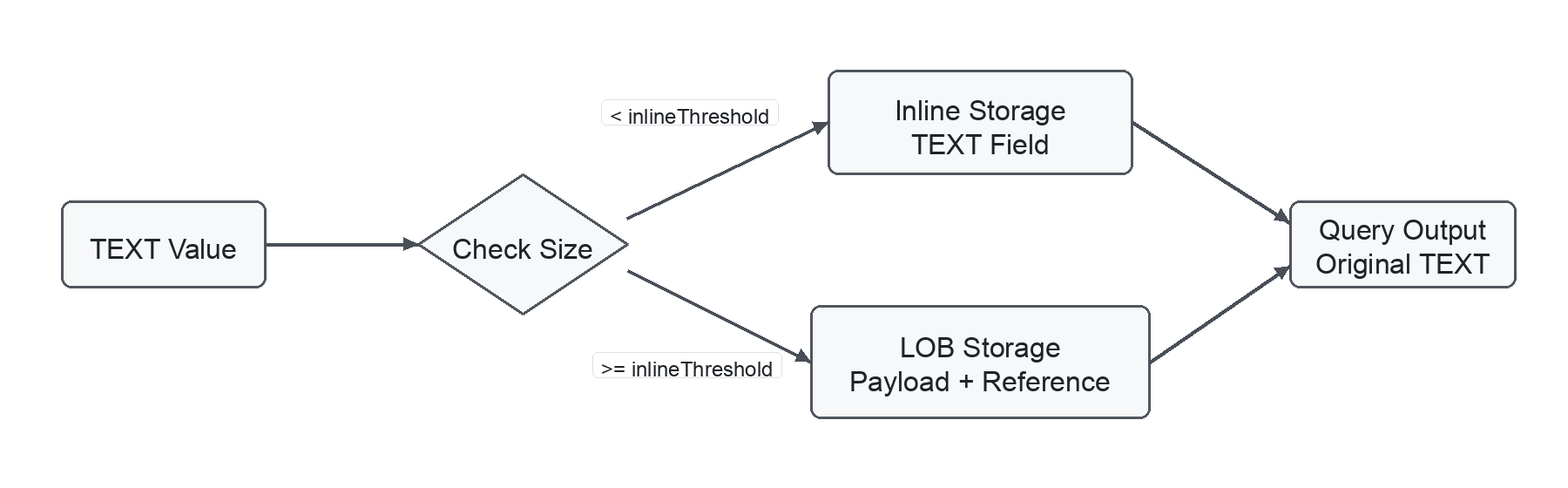 Large text storage
- Inline storage: If a
TEXTvalue is smaller thandataNode.text.inlineThreshold, Milvus stores the original text value directly in theTEXTfield data. - LOB storage: If a
TEXTvalue is greater than or equal todataNode.text.inlineThreshold, Milvus treats the value as a large object and stores the original text separately in object storage, such as MinIO. TheTEXTfield data stores an internal reference to the separately stored text. When theTEXTfield is requested in query or search results, Milvus uses the reference to retrieve and return the original text.
This storage selection is internal. You insert, query, and search the TEXT field in the same way regardless of which storage path Milvus uses. To tune the threshold or related storage, compaction, and garbage-collection behavior, refer to dataNode-related Configurations and dataCoord-related Configurations.
If your deployment uses object storage, large TEXT values may appear as Milvus-managed objects under paths such as lobs/.... These objects are implementation details and should not be moved, copied, or deleted manually. After you delete entities, drop partitions, or compact data, object storage usage may decrease only after Milvus garbage collection removes unreferenced large-object data after its safety window.
A common use of TEXT is Full Text Search with BM25. In this pattern, the TEXT field stores the original source content, and BM25 analyzes the text and generates sparse vectors for ranking keyword-based matches. Search results can then return the matched TEXT value as context for LLM or agent workflows. The following example shows how to use a TEXT field as the input field for BM25. To learn about Full Text Search concepts and query options, refer to Full Text Search.
Step 1: Create a collection with a TEXT field
The following example creates a collection with a TEXT field for source content and a sparse vector field for BM25-generated sparse vectors. The BM25 function converts the tokenized text from content into sparse vectors stored in sparse.
For BM25 full text search, the input TEXT field must set enable_analyzer=True.
from pymilvus import DataType, Function, FunctionType, MilvusClient

client = MilvusClient(uri="http://localhost:19530")
COLLECTION_NAME = "text_bm25_collection"

if client.has_collection(COLLECTION_NAME):
    client.drop_collection(COLLECTION_NAME)

schema = client.create_schema(auto_id=False, enable_dynamic_field=False)
schema.add_field(field_name="id", datatype=DataType.INT64, is_primary=True)
schema.add_field(
    field_name="content",
    datatype=DataType.TEXT,
    enable_analyzer=True,
)
schema.add_field(field_name="sparse", datatype=DataType.SPARSE_FLOAT_VECTOR)

bm25_function = Function(
    name="content_bm25",
    input_field_names=["content"],
    output_field_names=["sparse"],
    function_type=FunctionType.BM25,
)
schema.add_function(bm25_function)
Step 2: Create a sparse vector index
Create an index on the sparse vector field generated by the BM25 function. The metric type must be set to BM25.
index_params = client.prepare_index_params()
index_params.add_index(
    field_name="sparse",
    index_type="SPARSE_INVERTED_INDEX",
    metric_type="BM25",
    params={
        "inverted_index_algo": "DAAT_MAXSCORE",
        "bm25_k1": 1.2,
        "bm25_b": 0.75,
    },
)

client.create_collection(
    collection_name=COLLECTION_NAME,
    schema=schema,
    index_params=index_params,
)
Step 3: Insert TEXT data
Insert text directly into the TEXT field. Do not provide values for the sparse field. Milvus generates the sparse vectors internally by applying the BM25 function to content.
data = [
    {
        "id": 1,
        "content": "Milvus stores vector embeddings and scalar fields in collections. It supports vector search, full text search, and metadata filtering for retrieval applications.",
    },
    {
        "id": 2,
        "content": "Long documents are often split into passages before embedding. Store each passage in a TEXT field so search results can return the source text.",
    },
    {
        "id": 3,
        "content": "Operational logs and support tickets often contain long natural-language text. TEXT fields can store these values without a fixed max_length setting.",
    },
]

client.insert(collection_name=COLLECTION_NAME, data=data)
client.load_collection(collection_name=COLLECTION_NAME)
Step 4: Perform BM25 full text search
Use raw query text as the search data and search against the sparse vector field. Milvus converts the query text into a sparse vector, ranks matches with BM25, and returns the requested TEXT field in output_fields.
results = client.search(
    collection_name=COLLECTION_NAME,
    data=["how does Milvus store source text for retrieval"],
    anns_field="sparse",
    limit=2,
    output_fields=["content"],
)
Step 5: Read the returned TEXT values
Each search hit includes the BM25 score and the original TEXT value.
for hit in results[0]:
    print(f"id: {hit['id']}, score: {hit['distance']}")
    print(hit["entity"]["content"])
For more information about BM25 functions, sparse vector indexes, and query syntax for full text search, refer to Full Text Search.